Which Provisioning Method, Then OS Configuration


DOCUMENT CATEGORY: Runbook SCOPE: How the OS install method decides what OS configuration does PURPOSE: Know which path your machines take from the OS install to ARM Deploy, and which method you used MASTER REFERENCE: Phase 03: OS Configuration
Status: Active
Overview
There are two ways the OS gets onto a machine, and OS configuration always starts after the OS install:
| Method | Who installs the OS | What exists when OS configuration starts |
|---|---|---|
| Simplified provisioning (azurelocal-ztp, or the portal tasks) | Azure, after the machine is claimed with its ownership voucher | An Arc-connected, Provisioned machine named <device-id>-1. With ZTP, also a handoff file |
| Manual ISO install (Phase 02, manual) | A person, at the BMC console, on every machine | An installed OS with no Arc machine yet |
Microsoft's installer for Azure Local is interactive. Nothing in this repository or in azurelocal-ztp installs the OS from an ISO without a person. If you want no one in the rack, use simplified provisioning with azurelocal-ztp. OS configuration then starts from the ZTP Handoff.
The flow
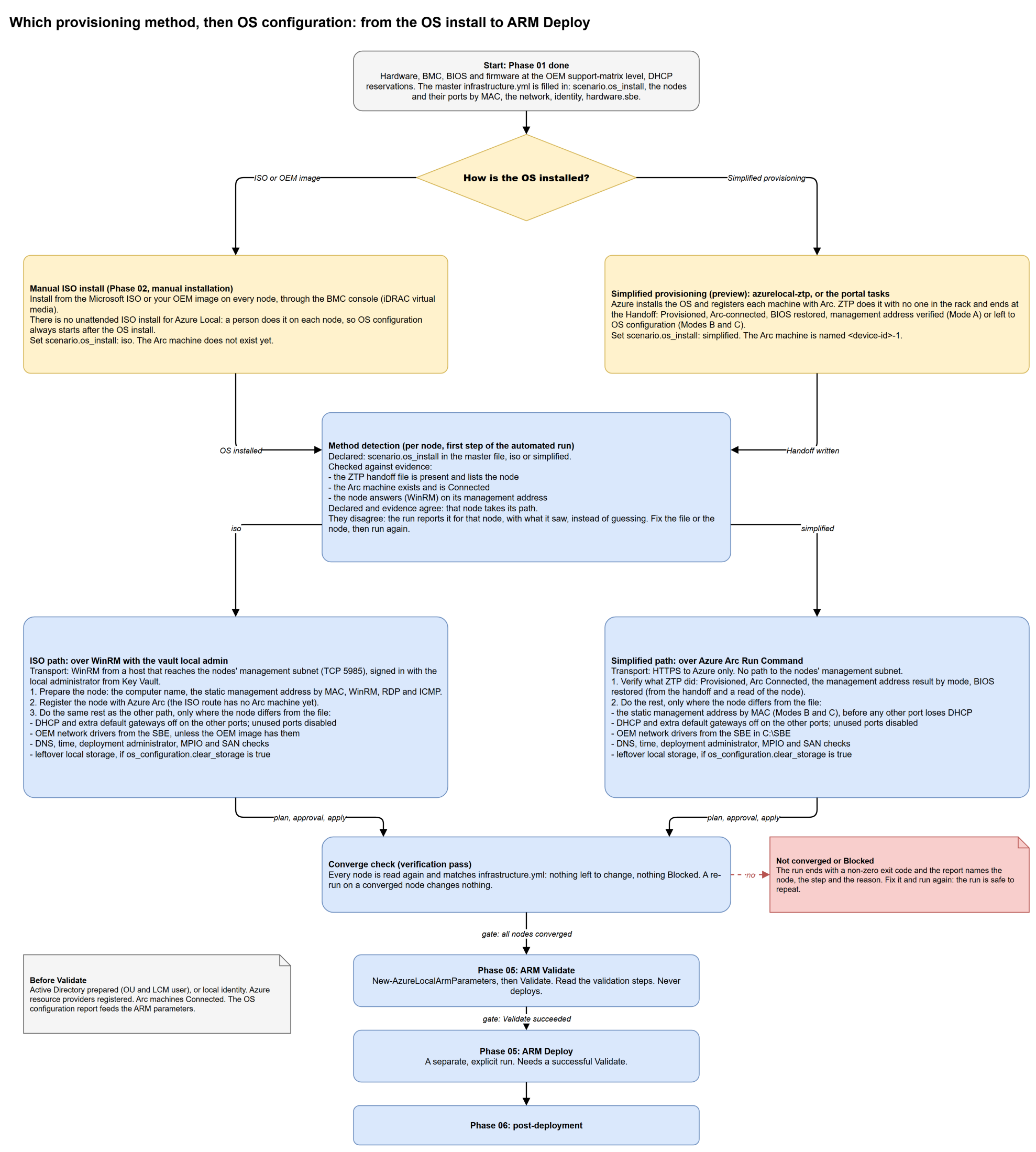
Select the diagram to open it full screen and zoom. Source: provisioning-to-os-configuration.drawio.
The two paths share most of their work. They differ in how they reach the node, and in what has to happen first:
| Simplified path | ISO path | |
|---|---|---|
| Reaches the node by | Azure Arc Run Command: the script goes through Azure to the Connected Machine agent. HTTPS to Azure only | WinRM, from a host that reaches the nodes' management subnet (TCP 5985), signed in with the local administrator from Key Vault |
| First | Verify what ZTP did: Provisioned, Arc Connected, the management address result for its mode, BIOS restored | Prepare the node: computer name, static management address by MAC, WinRM, RDP and ICMP; register it with Arc |
| Management address | Mode A: verified. Modes B and C: set by MAC (the OS install reset it) | Set by MAC |
| Then, only where the node differs from the file | DHCP and extra gateways off, unused ports disabled, OEM drivers and SBE, DNS, time, local administrator, MPIO and SAN checks, optional storage wipe | The same |
| Arc machine | Exists, named <device-id>-1; the run finds it from the handoff | Created by the registration step |
Method detection
At the start of the automated run, each node's method is declared in the master file and checked against evidence. Nothing is guessed from the file alone.
| Declared | Evidence the run looks for |
|---|---|
scenario.os_install: simplified | the ZTP handoff file is present and lists the node; the node's Arc machine exists and is Connected; the node answers |
scenario.os_install: iso | no Arc machine for the node yet; the node answers on its management address over WinRM |
- They agree: the node takes its path.
- They disagree (for example the file says
isobut the Arc machine is already Connected): the run reports the mismatch for that node, with what it found, and does not carry on for it. Correctscenario.os_installor the node's state, then run again.
Method detection is part of the wrapper in the azurelocal-toolkit. The wording above follows its design. If the shipped wrapper words a rule differently, the wrapper's Get-Help is the reference.
Which method did I use?
If you are not sure how the machines in front of you were installed, check these in order:
| Question | Simplified (ZTP) | Simplified (portal) | ISO |
|---|---|---|---|
Did you run Invoke-ZtpEnvironment.ps1? | Yes | No | No |
Is there a <run>.ztp-handoff.json in the ztp-state folder under the media folder? | Yes | No | No |
| In the Azure portal, under Azure Arc > Operations > Provisioning (preview) > Provisioned machines, is the machine listed as Ready to cluster? | Yes | Yes | No |
Is the Arc machine named <device-id>-1 and Connected? | Yes | Yes | No Arc machine until Phase 04 |
| Did anyone use the install wizard at the BMC console? | No | No | Yes |
Does the computer name look like WIN-... until you set it? | No: provisioning set it | No | Yes |
Still unsure: run the plan. It changes nothing, and for every node it prints the method it detected and the evidence behind it. Then set scenario.os_install to match.
That is fine. Set scenario.os_install: simplified, give each node's arc_machine_name (the <device-id>-1 name from the portal), and leave the handoff out. The run finds the Arc machine by name in azure.resource_group.
After OS configuration
When every node matches the file, the run ends with a report and a zero exit code. Then:
- Prepare Active Directory (or choose local identity) and confirm the Azure resource providers are registered.
- Phase 05: ARM Validate, which reads the OS configuration report for the adapter names by MAC and the SAN disks. Validate never deploys.
- Phase 05: ARM Deploy, a separate run that needs a successful Validate.
On the ISO route, if you registered the nodes by hand, continue with Phase 04: Arc registration first. The simplified route skips Phase 04.
Navigation
| ← Phase 03: OS Configuration | ↑ Part 4: Cluster Deployment | Automated OS configuration → |
References
- Automated OS configuration
- How the run works, step by step
- Choose your route
- azurelocal-toolkit: OS configuration and ARM deployment
- Microsoft Learn: Simplified machine provisioning
| Version | Date | Author | Changes |
|---|---|---|---|
| 1.0 | 2026-11-07 | Azure Local Cloud | Initial release |