Choose Your Route: ISO or Simplified Provisioning


DOCUMENT CATEGORY: Runbook SCOPE: Choosing the OS installation route, and the OS steps each route needs PURPOSE: Know which phases and tasks to run before cluster Validate MASTER REFERENCE: Microsoft Learn — Install the OS and Simplified machine provisioning
Status: Active
Overview
Every machine has to reach the same state before cluster Validate: the Azure Local OS installed, the OEM's drivers and Solution Builder Extension (SBE) in place, one static management address with one default gateway, the right DNS and time, and an Azure Arc machine with its mandatory extensions. Part 4 gets there by one of two routes:
| Route | How the OS gets there | Status |
|---|---|---|
| ISO or OEM image | You install from the Microsoft ISO or your OEM's image (Manual OS Installation), configure the OS (Phase 03), then register with Arc (Phase 04) | GA |
| Simplified machine provisioning | Azure installs the OS and registers the machine with Arc. You do it in the portal, then Task 06, or end to end with the azurelocal-ztp automation | Preview, East US only, no Arc gateway |
Simplified provisioning does not do everything Phase 03 does. It leaves Microsoft's inbox network drivers, an empty C:\SBE, DHCP, and a default gateway on more than one adapter. Those still have to be fixed before Validate. The decision matrix below lists each step.
OS requirements change between Azure Local releases and between OEM images. Before you run Validate, check Microsoft Learn's OS installation steps and your OEM's deployment guide for your build and hardware, for example Dell's deployment and operations guide. This page is a map, not a replacement for them.
The flow
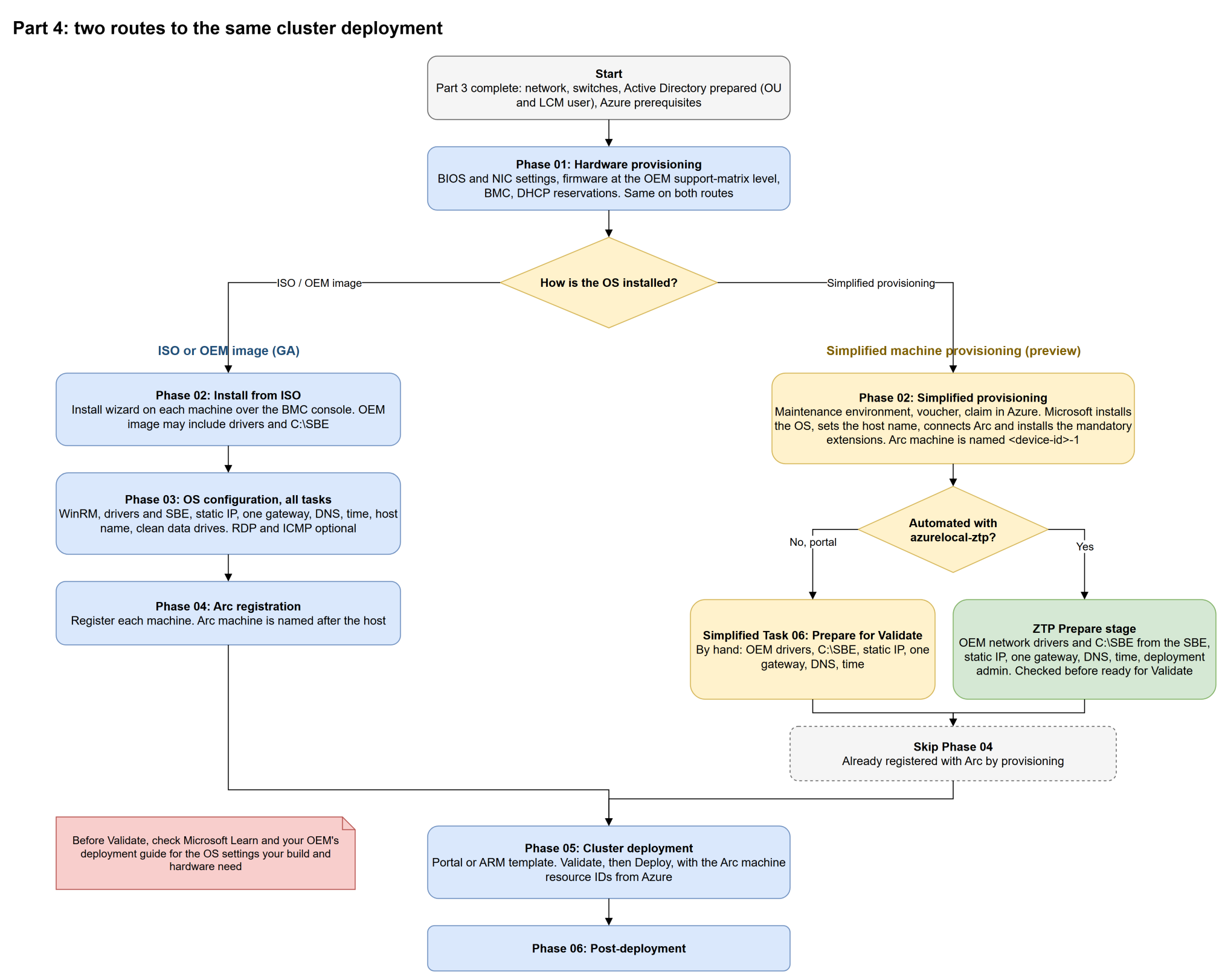
Select the diagram to open it full screen and zoom. Source: cluster-deployment-routes.drawio.
Which route
| Question | ISO or OEM image | Simplified provisioning |
|---|---|---|
| Production deployment today | ✅ Use this | ⚠️ Preview |
| Hardware on Microsoft's validated list for simplified provisioning | Any catalog hardware | Dell AX-650 and AX-750, Lenovo ThinkAgile MX650 V3 and V4, HPE ProLiant DL360 Gen11 (Learn) |
| Arc gateway | ✅ Supported | ❌ Not supported in the preview |
| Region of the provisioning resources | Any supported region | East US only |
| No one at the console | Needs BMC console work per machine | Azure does the install. With azurelocal-ztp, no USB stick either |
| Arc machine name | The host name | <device-id>-1, named by the service. See the known issue |
Decision matrix
Each row is a step that has to be done, or checked, before cluster Validate. Columns:
- ISO / OEM image: you install from an ISO and follow Phases 02 to 04.
- Simplified, portal: you provision with Microsoft's simplified machine provisioning in the portal.
- Simplified, azurelocal-ztp: you run the azurelocal-ztp automation through its Prepare stage.
Legend: You = a step you run · Microsoft = done by the provisioning service · ZTP = done and checked by azurelocal-ztp · Optional · n/a.
On the portal path, Simplified Provisioning Task 06: Prepare Machines for Validate covers the You rows of the OS configuration table.
Before the OS
| Step | ISO / OEM image | Simplified, portal | Simplified, azurelocal-ztp | Source |
|---|---|---|---|---|
| BIOS settings: virtualization, Secure Boot, TPM, system profile | You (Phase 01) | You. Secure Boot and TPM are required | You. ZTP doesn't check BIOS settings | Learn, Dell BIOS and iDRAC |
| NIC settings for RDMA, for example "NIC + RDMA Mode" on Intel E810 | You (Phase 01) | You | You | Dell deployment guide |
| Firmware at the OEM support-matrix level | You. Some OEM images update firmware during imaging | You | You. ZTP doesn't update firmware | Learn, Dell SBE release notes: the SBE can't update firmware or drivers during deployment |
| Active Directory: OU and LCM user | You (Part 3) | You | You | Learn |
| DHCP reservation for each management MAC | Optional | Recommended | You. Prepare signs in on that address before it makes it static | Learn decision 8 |
Install and Arc
| Step | ISO / OEM image | Simplified, portal | Simplified, azurelocal-ztp | Source |
|---|---|---|---|---|
| Install the OS | You (Phase 02) | Microsoft | Microsoft, started by ZTP | Learn |
| Local administrator password, the same on every machine | You | Microsoft, from the site's Key Vault secret | Microsoft, from the site's Key Vault secret | Learn |
| Host name | You (task 10) | Microsoft, from the machine name you give | Microsoft, from cluster_nodes[].name | Learn, seen on live runs |
| Remove virtual media | You | You: take out the USB stick, disable USB boot in the BIOS | ZTP ejects the virtual USB | Learn |
| Register with Azure Arc and install the mandatory extensions | You (Phase 04) | Microsoft. Skip Phase 04 | Microsoft. Skip Phase 04 | Learn |
OS configuration (Phase 03)
| Step | ISO / OEM image | Simplified, portal | Simplified, azurelocal-ztp | Source |
|---|---|---|---|---|
| WinRM for remote management | You (task 01) | Already on | Already on | Seen on live runs |
| OEM drivers | You, unless your OEM image includes them | You. Provisioning leaves Microsoft's inbox drivers | ZTP installs the network drivers from the SBE | Learn, inbox drivers aren't supported |
SBE files in C:\SBE | You, unless your OEM image includes them | You | ZTP, with the hash checked against the OEM's manifest | Learn, Dell SBE release notes |
| Static management IP | You (task 03) | You. Provisioning uses DHCP | ZTP | Learn |
| One default gateway, on the management adapter only | You (task 04) | You. Live runs had a gateway on two adapters | ZTP | Learn decision 8 |
| DNS servers that resolve your domain | You (tasks 05 and 06) | Check: provisioning takes them from DHCP | ZTP | Learn. DNS can't change after deployment |
| Time server | You (task 07) | Set the site's time server, or set it on each machine | ZTP sets onprem.ntp_servers and waits for sync | Learn |
| Keep the iDRAC USB NIC (Remote NDIS) enabled, with DHCP | Leave it alone | Leave it alone | Left alone | Dell SBE release notes: SBE health checks need it |
| Disable disconnected adapters | You (task 09) | Optional | Optional. Not needed when every port is cabled | Dell deployment guide |
| RDP | Optional (task 02) | Optional | Optional, not done | Learn, Dell |
| ICMP (ping) | Optional (task 08) | Optional | Optional, not done | Dell |
| Clean non-OS drives | You, on reused hardware (task 11) | Check on reused hardware | Check on reused hardware. ZTP doesn't wipe drives | Learn |
| Don't install Windows updates before deployment | Don't | Don't | ZTP doesn't | Learn |
| Domain join before deployment | Optional from 2604 | Optional | Not done. Deployment joins the machines | Learn |
| Deployment admin account | You | You | ZTP creates credentials.local_admin_username | Learn ARM template parameters |
Rows marked that way were read from two Dell AX-760 machines right after simplified provisioning, before any change: inbox drivers, an empty C:\SBE, DHCP on the management adapter, a default gateway on two adapters, DNS from DHCP, and time.windows.com as the time source. Cluster Validate then passed after the azurelocal-ztp Prepare stage, without RDP, ICMP, disabled adapters or a drive wipe.
Known issue: Arc machine names at Deploy
Simplified provisioning names each Azure Arc machine <device-id>-1, not after the host. On build 12.2690.1003.15, cluster Deploy failed at Deploy Arc infrastructure components with ParentResourceNotFound: that step installs an Arc extension on the Arc machine named after the host, and no such machine exists. Validate passes, because the deployment content that runs this step is only downloaded when Deploy starts, and Validate's Arc checks use the resource IDs you pass in.
Before you deploy on the simplified route, check the troubleshooting page and Microsoft's known issues for your build. The ISO route isn't affected, because the Arc machine carries the host name.
Navigation
| ← Part 4 overview | ↑ Part 4: Cluster Deployment | Phase 01: Hardware Provisioning → |
References
- Microsoft Learn — Install the Azure Stack HCI OS by using SConfig
- Microsoft Learn — Simplified machine provisioning (preview)
- Microsoft Learn — Prepare Active Directory
- Microsoft Learn — Deploy via ARM template
- Dell — Deployment and operations guide with scalable networking
- Dell — BIOS and iDRAC settings for Azure Local
- Dell — SBE 2606 release notes
- azurelocal-ztp documentation
| Version | Date | Author | Changes |
|---|---|---|---|
| 1.0 | 2026-11-06 | Azure Local Cloud | Initial release |