Zero-Touch Provisioning Automation (Preview)


DOCUMENT CATEGORY: Runbook SCOPE: Automated simplified machine provisioning with azurelocal-ztp PURPOSE: Take machines from bare metal to ready for cluster Validate with no one in the rack MASTER REFERENCE: Microsoft Learn — Simplified Machine Provisioning
Status: Active
Simplified machine provisioning is in preview. Review the Supplemental Terms of Use for Microsoft Azure Previews before you use it.
- Region: East US only (Learn).
- Arc gateway: Not supported (Learn).
- Hardware: Learn lists Dell AX-750 and AX-650, Lenovo ThinkAgile MX650 V3 and V4, and HPE ProLiant DL360 Gen11 as validated hardware. The automation was proven on Dell AX-760 with iDRAC 7.30. That model is not on Learn's validated list for this flow, so the result is a proof, not Microsoft support.
- Scope: The automation stops at "ready for Validate". It does not prepare Active Directory, run Validate, or deploy the cluster.
Overview
The portal route of simplified machine provisioning needs a person in the rack for the USB boot, then a person in the Azure portal to upload vouchers. The azurelocal-ztp scripts replace both with automation. Given one environment file and one folder of OEM files, they:
- Build one virtual USB image per machine from Microsoft's maintenance environment.
- Attach each image through the machine's BMC (Redfish), boot the machine once from it, and collect the ownership voucher it writes.
- Claim the machines in Azure with the vouchers, so Azure installs the OS and registers each machine with Azure Arc.
- Install the OEM's network drivers and set one static management address on each machine.
The run ends when every machine reports "ready for Validate". The azurelocal-ztp repository holds the scripts, the full parameter reference and example pipelines. This section explains the design and how to run it. It does not copy the scripts.
Other pages on this site describe azurelocal-ztp as mounting the maintenance ISO as BMC virtual media. The current automation builds a raw virtual USB image per machine and attaches it to the BMC's USB-stick slot. The maintenance environment writes the ownership voucher back to the media it booted from, and the automation reads the voucher from that image.
When to use this route
| Choose | When |
|---|---|
| Automated route (this section) | The machines' BMCs are reachable from a Windows management host, you want a repeatable run with evidence at each step, or you provision many machines or sites. |
| Portal route (Tasks 1 to 5) | Someone is on site with USB media, the BMC is not reachable from a management host, or you want to follow Microsoft's documented steps exactly. |
| ISO route (Phase 02) | You need a generally available method, Arc gateway, or hardware that simplified provisioning doesn't cover. |
The flow
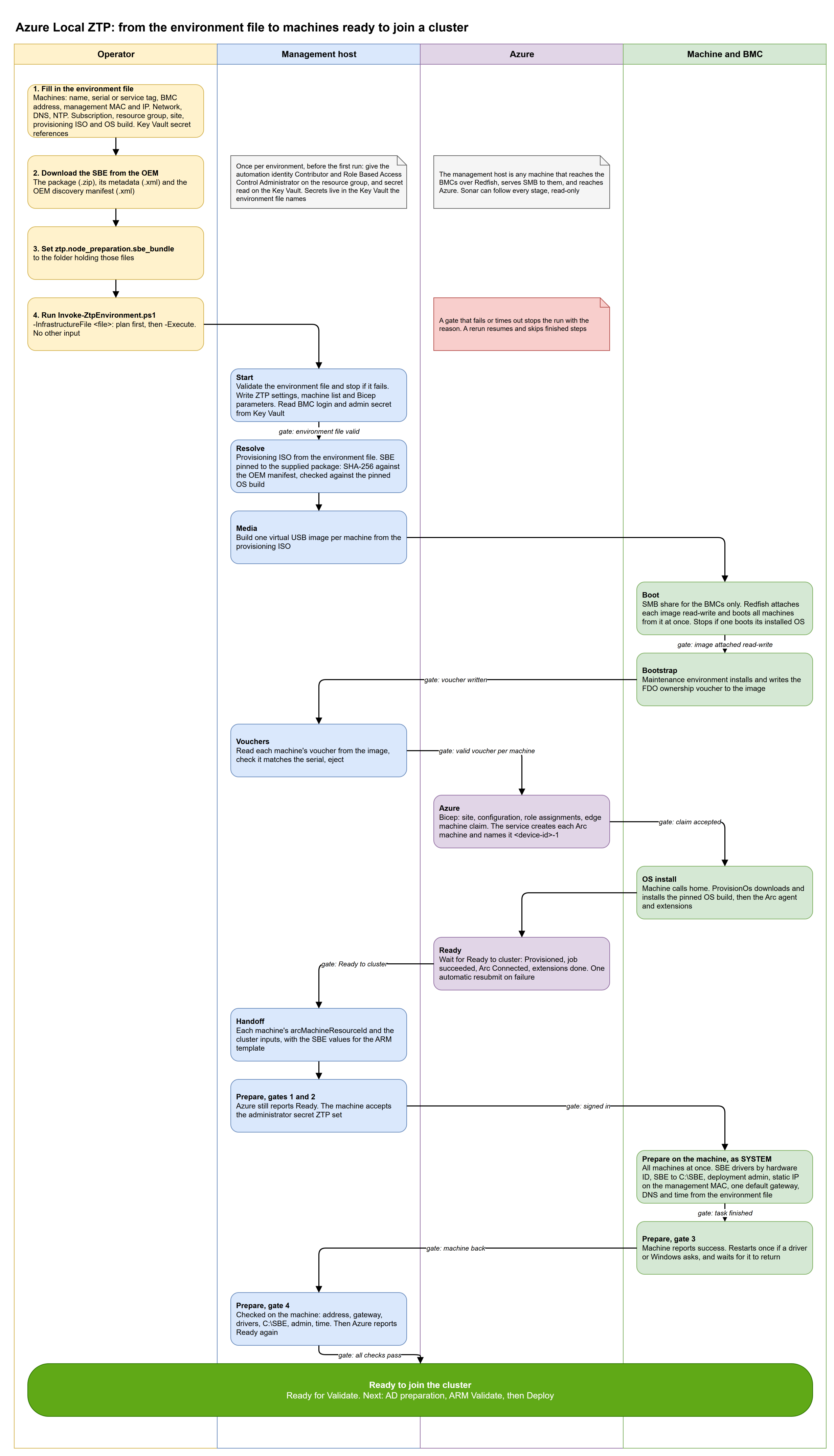
The chart has four lanes. The operator supplies two inputs. The management host does the work it can do locally. Azure claims the machines and installs the OS. The machines and their BMCs carry out the boot and the on-machine preparation. Each arrow that crosses a lane carries a gate, shown as a label on the line.
Stages and gates
You start the whole run with Invoke-ZtpEnvironment.ps1. It validates the environment file, writes the settings that the stage scripts need, and calls Invoke-ZtpProvisioning.ps1 (Resolve to Handoff) and then Initialize-ZtpNode.ps1 (Prepare).
Each stage runs only after the previous stage's gate passes. A gate that fails or times out stops the run with the reason.
| Stage | What it does | Gate or evidence |
|---|---|---|
| Resolve | Finds, downloads and hash-verifies the newest maintenance ISO for the train you pin. Stages the OEM SBE named by the package you supplied. That package pins the SBE version. | ISO SHA-256. SBE SHA-256 matches the OEM manifest. |
| Media | Builds one raw virtual USB image per machine from the ISO. Optionally sets a password for the maintenance environment's edgeuser account (only its hash enters the image). | One image per machine. |
| Boot | Shares the images over SMB (read-write, inbound TCP 445 allowed only from the BMC addresses, through a dedicated local account), closes stale SMB handles, inserts each image into the BMC's USB-stick slot, sets a one-time boot, and resets the machine. All machines run in parallel, one worker each. | The BMC reports the one-time boot override (Once, Floppy) before the reset. The iDRAC log is watched for 10 minutes for event OSE1002, logged as "C: boot completed", which the automation reads as the installed OS booting. |
| Bootstrap | Waits for the maintenance environment to run and to write the voucher back into each image. | A voucher per machine. |
| Vouchers | Reads each voucher from the image, checks it matches the machine serial, replaces a spent local copy, ejects the media, and removes the share. | A valid voucher per serial. |
| Azure | Prerequisite gate, Bicep validate, plan, and claim. | Deployment accepted. |
| Ready | Waits for "Ready to cluster" on every machine. Resubmits a failed ProvisionOs job once, by sending the PUT for jobs/ProvisionOs again. | Provisioned, job succeeded, Arc Connected, extensions done. |
| Handoff | Writes one handoff file per run and the cluster inputs. | Files written. |
| Prepare | Runs Initialize-ZtpNode.ps1 on all machines in parallel. See Prepare stage. | "<node> is ready for Validate". |
The Azure stage prerequisite gate checks that:
- the maintenance environment is running on every machine,
- the
Microsoft.DeviceOnboarding/AzureLocalZTPfeature and the resource providers are registered, and - the operator holds Contributor and Role Based Access Control Administrator on the resource group.
The plan refuses to submit if a voucher is missing or invalid.
Learn states that simplified machine provisioning doesn't retry a failed OS installation from the service, and it gives a manual resubmit procedure. The Ready stage does that resubmit once, automatically. See Troubleshooting and known issues.
Prepare stage
A new Azure Local machine comes out of provisioning with Microsoft's inbox network drivers, DHCP and a default gateway on more than one port, and an empty C:\SBE. Learn says inbox drivers aren't supported, and that network validation fails if more than one physical adapter has a default gateway. Dell states that the SBE can't install drivers or firmware during deployment, so the drivers go on before Validate and Deploy. The Prepare stage installs them. It runs these gates in order:
| Gate | What must be true |
|---|---|
| 1. Azure Ready | Azure reports the machine Ready to cluster: provisioned, ProvisionOs succeeded, Arc Connected, extensions done. |
| 2. Sign-in | The machine accepts a sign-in with the ZTP administrator secret. |
| (changes) | The SBE files are copied to C:\SBE and hash-checked. Network drivers are chosen from the SBE by PCI hardware ID, and their catalog signatures are checked. The deployment administrator is created. Then, as SYSTEM in a scheduled task, the machine installs the drivers (pnputil), sets a static IP on the management MAC, turns DHCP and the gateway off on every other routable adapter and on same-model siblings, and sets DNS and time. If the static address fails, DHCP comes back on. |
| 3. Result | The machine answers again and reports success. If a driver or Windows asks for a restart, the machine restarts once and the run waits for a new boot time. |
| 4. Checks | Static address, one default gateway, every adapter on the SBE's driver, C:\SBE complete, and the deployment administrator present. Then Azure reports the machine Ready again, so Arc survived the change. |
The changes run as SYSTEM in a scheduled task so a dropped remote session doesn't stop them. The restart is scheduled about 10 seconds out so the remote call returns before the machine goes down.
The iDRAC presents a USB link to the operating system (Remote NDIS, 169.254.0.x) as a network adapter. It has no gateway, is not a cluster port, and must stay out of your network intents.
What runs where
| Where | What runs there |
|---|---|
| Management host (Windows) | The environment file check, Resolve, Media, the SMB share, the BMC calls (Redfish over HTTPS), voucher read-back, the Azure calls, the handoff, and the Prepare gates. |
| BMC | Attaches the image, applies the one-time boot, and resets the machine. The iDRAC's SMB client connects out to the management host on TCP 445 to read and write the image. No inbound port is needed on the BMC. |
| Machine | Boots the maintenance environment, writes the voucher, then calls home to Azure. Azure installs the OS onto it. After the OS is up, the Prepare changes run on it, started through WinRM. |
| Azure | Holds the site, the site configuration, the role assignments and the machine claim. Runs the OS install job and Arc registration. |
The management host must be Windows. The Boot stage shares the images over SMB with Windows commands. See Prerequisites.
Parallel machines
- Boot uses one worker per machine, so all machines boot at the same time.
- Prepare unpacks and verifies the SBE once, then uses one worker process per machine, so all machines are prepared at the same time.
- Resolve, Azure and Handoff run once for the whole set of machines.
A full run took about 1.5 to 2 hours on the proven setup (two machines).
You can name a subset with -Node. Each set of machines keeps its own state file, so proving one machine never disturbs another's run.
Plan by default
Without -Execute, Invoke-ZtpEnvironment.ps1 writes the generated files and shows the plan. Nothing changes in Azure or on a machine. Run the plan first and read it.
With -Execute, the run reinstalls the named machines. The Boot stage needs a confirmation that the machines carry no cluster to keep, and Invoke-ZtpEnvironment.ps1 supplies it for you when you pass -Execute. Don't run it against machines that hold data you need.
Resume
The orchestrator records each completed stage in a state file. If a run stops, fix the cause and run the same command again. Completed stages aren't repeated.
To force a restart from a stage, pass -From <Stage>. That stage and every later stage run again, whatever the state file says. The valid stage names are Resolve, Media, Boot, Bootstrap, Vouchers, Azure, Ready, Handoff and Prepare.
After the Boot stage, each image holds that machine's voucher. A run that starts from Resolve or Media rebuilds the images, so once vouchers exist use -From Azure, -From Ready or a later stage.
Security
- Change the iDRAC factory password on every BMC before you automate it, and keep the BMC credential in Key Vault only.
- Treat vouchers as secrets. A voucher proves ownership of a machine. Restrict the folder that holds them and delete them when provisioning is done.
- The read-write SMB share is a tampering risk while it is up. The BMC can write to it, and so can anyone who reaches it. The automation limits inbound TCP 445 to the BMC addresses with a firewall rule it creates, uses a dedicated local account, and removes the share after the Vouchers stage. Keep the management host on an isolated network, and consider requiring SMB signing.
- Match firmware to the OEM's Azure Local support matrix before you start. Only iDRAC 7.30 was proven.
- After a failed Boot stage, check on each BMC that the media is ejected and the one-time boot is cleared before you retry.
Steps in this section
| Page | What it covers |
|---|---|
| Prerequisites | Azure, hardware and BMC, network paths, management host |
| Operator inputs | The environment file and the OEM SBE folder |
| Run from a management host | Plan, run, watch, and resume on a Windows host |
| Run from a pipeline | Self-hosted Windows runner, identity, Key Vault secrets, approval before Boot |
| Output and handoff | "Ready for Validate" and what to give cluster deployment |
| Troubleshooting and known issues | Issues found on live runs and Learn's recovery steps |
Where the scripts live
The scripts, the full parameter reference, the JSON schemas and the example pipelines are in the azurelocal-ztp repository. Use that repository as the source of truth for parameter names and defaults. You can follow a run live with azurelocal-sonar, and check endpoints and network readiness first with azurelocal-beacon.
Navigation
| ← Simplified Provisioning Overview | ↑ Phase 02: OS Installation | Prerequisites → |
References
- Microsoft Learn — Simplified Machine Provisioning
- Microsoft Learn — Troubleshoot Simplified Machine Provisioning
- Microsoft Learn — Host network requirements
- azurelocal-ztp repository
| Version | Date | Author | Changes |
|---|---|---|---|
| 1.0 | 2026-11-05 | Azure Local Cloud | Initial release — zero-touch provisioning automation |