Part 4: Cluster Deployment


DOCUMENT CATEGORY: Runbook
SCOPE: Azure Local cluster deployment
PURPOSE: Deploy and configure Azure Local cluster
MASTER REFERENCE: Microsoft Learn - Deploy Azure Local
Status: Active
This part covers the core deployment of the Azure Local cluster, from OS installation through cluster creation and initial configuration.
Choose your route first
Part 4 has two routes to the same cluster deployment: install from an ISO or OEM image (Phases 02, 03 and 04), or simplified machine provisioning (preview), where Azure installs the OS and registers the machine with Arc, so Phase 04 is skipped and only part of Phase 03 applies. Choose your route has the flow chart and a decision matrix of every OS step on each route.
Whichever route you take, check Microsoft Learn's OS installation steps and your OEM's deployment guide for your build and hardware before you run Validate.
Bare metal to a deployed cluster
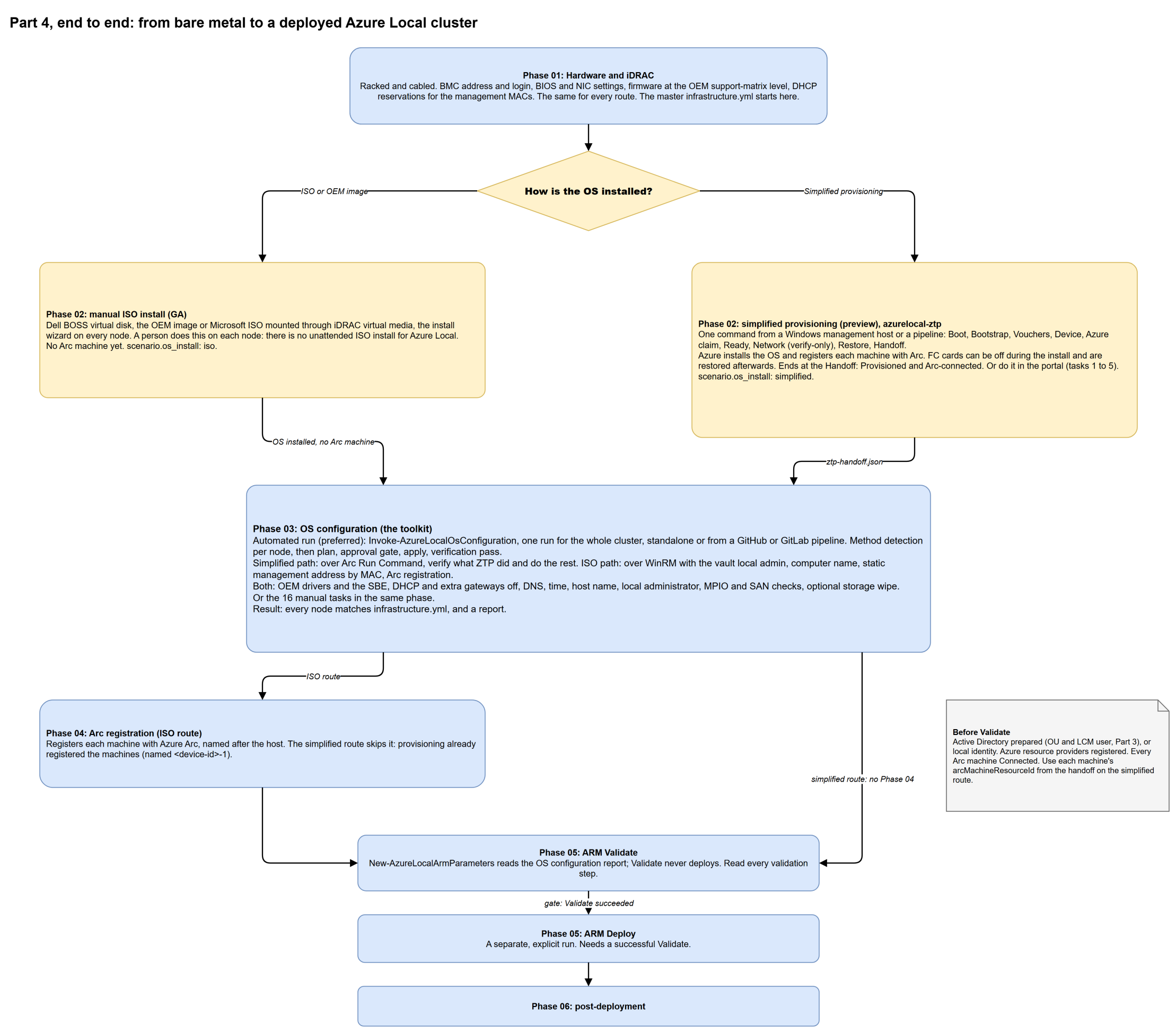
Select the diagram to open it full screen and zoom. Source: bare-metal-to-cluster.drawio.
| Phase | Pages |
|---|---|
| Phase 01: Hardware and iDRAC | Hardware provisioning |
| Phase 02: OS provisioning | Manual ISO install or simplified provisioning with azurelocal-ztp |
| Phase 03: OS configuration | Which method did I use?, Automated OS configuration, How the run works, or the manual tasks |
| Phase 04: Arc registration | Arc registration (ISO route only) |
| Phase 05: ARM Validate and Deploy | Cluster deployment |
| Phase 06: Post-deployment | Post-deployment |
Stages Covered
| Stage | Description | Scripts |
|---|---|---|
| 11 | Hardware Provisioning | phase-01-hardware-provisioning/ |
| 12 | OS Installation | phase-02-os-installation/ |
| 13 | OS Configuration | phase-03-os-configuration/ |
| 14 | Register with Azure Arc | phase-04-arc-registration/ |
| 15 | Deploy Cluster | phase-05-cluster-deployment/ |
| 16 | Post-Deployment Config | phase-06-post-deployment/ |
In This Section
- OS Installation - Azure Stack HCI OS deployment via USB or PXE
- OS Configuration - Host configuration, networking, domain join
- Arc Registration - Connect servers to Azure Arc
- Cluster Creation - Deploy Azure Local cluster via Azure Portal or ARM
Deployment Methods
Azure Local cluster deployment supports two primary methods: Azure Portal (wizard-driven, recommended for initial deployments) and ARM Template (declarative, repeatable, suited for automation and multi-site deployments). For full details on each approach including prerequisites, trade-offs, and step-by-step instructions, see Deployment Methods.
Key Deliverables
| Deliverable | Description |
|---|---|
| OS Installed | Azure Stack HCI OS on all nodes |
| Network Configured | Management, storage, compute networks |
| Domain Joined | Nodes joined to Active Directory |
| Arc Registered | Servers visible in Azure Portal |
| Cluster Created | Azure Local cluster deployed |
| Storage Configured | Storage Spaces Direct pool |
Companion tools
- Beacon validates endpoint, network, and hardware readiness before you start. It boots from virtual media or USB with no installed OS.
- ZTP automates simplified machine provisioning end to end by using BMC and Redfish. See the automated route.
- Sonar is a real-time monitor for the deployment steps and logs.
Prerequisites
Complete all on-premises prerequisites before starting cluster deployment.
- Completed On-Premises Readiness
- Azure Stack HCI OS media available
- Network infrastructure configured
- Active Directory prepared
- Azure Arc prerequisites met
Quick Navigation
| Stage | Name | Description |
|---|---|---|
| Choose your route | ISO or simplified provisioning, and the decision matrix | |
| 11 | Hardware Provisioning | BIOS, iDRAC, and network reservations |
| 12 | OS Installation | Azure Stack HCI OS deployment |
| 13 | OS Configuration | Host networking and domain join |
| 14 | Arc Registration | Connect servers to Azure Arc |
| 15 | Cluster Deployment | Deploy Azure Local cluster |
| 16 | Post-Deployment | WAC, storage, images, and networks |
Next Steps
After cluster deployment, proceed to Operational Foundations for monitoring, security, and backup configuration.
| Version | Date | Author | Notes |
|---|---|---|---|
| 1.0 | 2026-03-03 | Azure Local Cloud | Initial release |