How the OS Configuration Run Works


DOCUMENT CATEGORY: Runbook SCOPE: The design and order of the automated OS configuration run PURPOSE: Read a plan or a failure and know why the run did what it did MASTER REFERENCE: Automated OS configuration
Status: Active
The flow
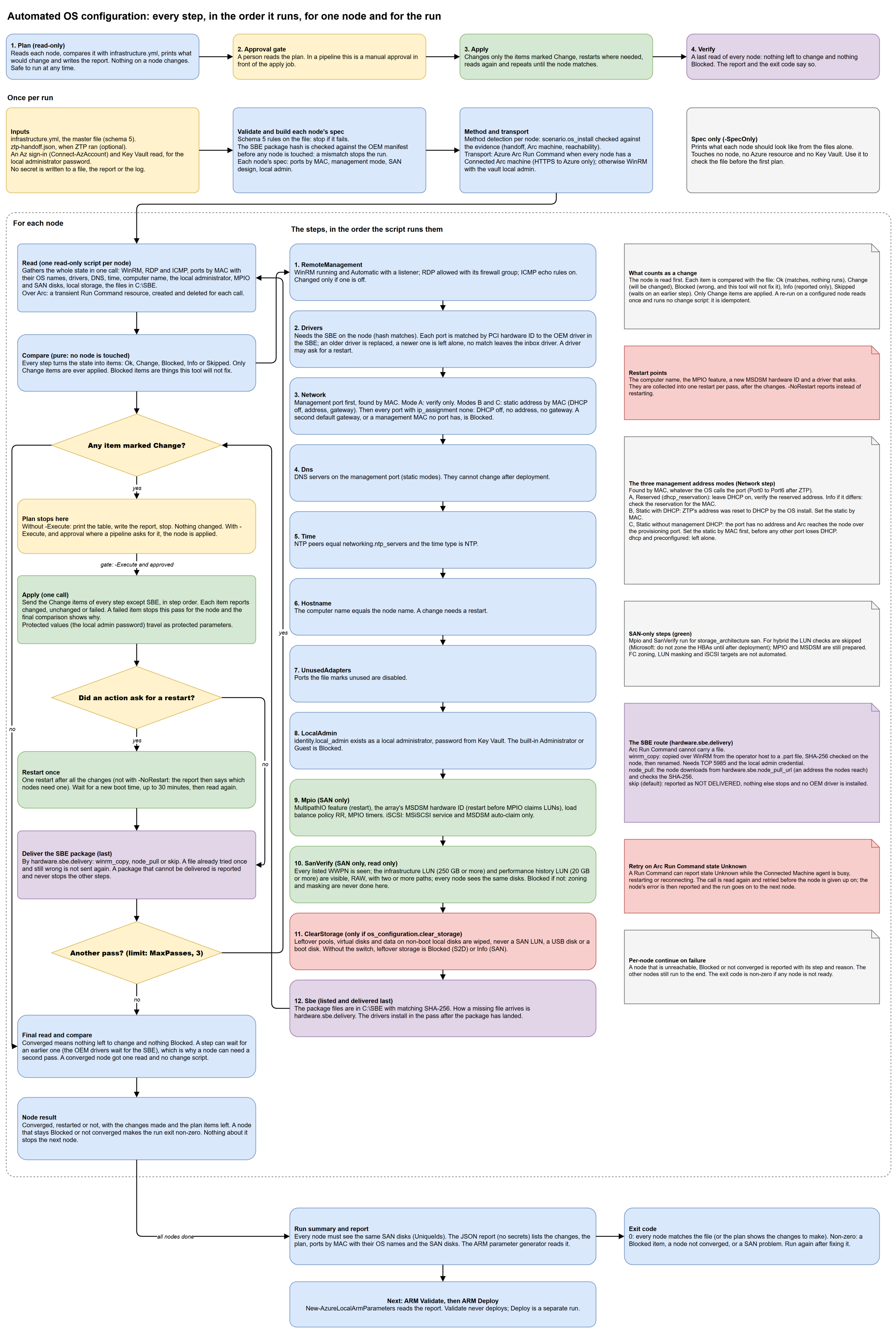
Select the diagram to open it full screen and zoom. Source: os-configuration-flow.drawio. The pipeline view is on Automated OS configuration.
The four stages
| Stage | What happens | Changes a node? |
|---|---|---|
| Plan | Each node is read, compared with the master file, and a table of what would change is printed. The report is written | No |
| Approval gate | A person reads the plan. In a pipeline this is a manual approval in front of the apply job | No |
| Apply | Only the items marked Change are applied, in step order, in one call per node. A restart follows if an action asked for one. The node is read again, and the loop repeats until it matches or the pass limit (three) is reached | Yes |
| Verify | A final read and comparison of every node. The report and the exit code say whether every node matches and nothing is Blocked | No |
What is read first, and what counts as a change
For every node, one read-only script gathers the state in a single call: WinRM, RDP and ICMP, every port by MAC with its OS name, drivers, DNS, time, the computer name, the local administrator, MPIO and the SAN disks, local storage, and the files in C:\SBE. Over Azure Arc each call is a transient Run Command resource that is created and deleted again.
The comparison then turns the state into items, each with one action:
| Action | Meaning |
|---|---|
| Ok | The node matches the file. Nothing runs |
| Change | The node differs and the tool can fix it. Only these are applied |
| Blocked | The node is wrong and the tool will not fix it. The node cannot converge until you do |
| Info | Reported only (for example an inbox driver with no OEM driver in the SBE) |
| Skipped | Waits on an earlier step (for example the OEM drivers wait for the SBE) |
Re-running is idempotent. A node that matches gets one read and no change script at all. A run that was interrupted can simply be run again: the first read shows what was already done.
The steps, in order
| # | Step | What it reads and compares | Restart? |
|---|---|---|---|
| 1 | RemoteManagement | WinRM running and Automatic with a listener; RDP allowed with its firewall group; ICMP echo rules on | No |
| 2 | Drivers | Needs the SBE on the node with a matching hash. Each port is matched by PCI hardware ID to the OEM driver in the SBE: an older driver is replaced, a newer one is left alone, no match leaves the inbox driver | A driver can ask |
| 3 | Network | The management port first, found by MAC, by mode (below). Then every port the file lists with ip_assignment: none: DHCP off, no address, no gateway. A second default gateway, or a management MAC that no port has, is Blocked | No |
| 4 | Dns | The DNS servers on the management port (static modes). They cannot change after deployment | No |
| 5 | Time | The NTP peers equal networking.ntp_servers and the time type is NTP | No |
| 6 | Hostname | The computer name equals the node name | Yes |
| 7 | UnusedAdapters | Ports the file marks unused are disabled | No |
| 8 | LocalAdmin | identity.local_admin exists as a local administrator, with its password from Key Vault. The built-in Administrator or Guest is Blocked | No |
| 9 | Mpio (SAN only) | The MultipathIO feature, the array's MSDSM hardware ID, load balance policy RR, the vendor's MPIO timers. For iSCSI: the MSiSCSI service and MSDSM auto-claim only | Yes (feature, new hardware ID) |
| 10 | SanVerify (SAN only, read only) | Every listed WWPN is seen; the infrastructure LUN (250 GB or more) and the performance history LUN (20 GB or more) are visible, RAW, with two or more paths; every node sees the same disks | No |
| 11 | ClearStorage | Leftover pools, virtual disks and dirty local disks. Wiped only with os_configuration.clear_storage. See Automated OS configuration | No |
| 12 | Sbe (delivered last) | The package files in C:\SBE with matching SHA-256. How a missing file arrives is hardware.sbe.delivery | No |
The three management address modes
The Network step finds the management port by MAC, whatever the OS calls it (ZTP-built machines name their ports Port0 to Port6). What it does depends on the mode in the file.
ip_assignment | Mode | The port after ZTP | What the step does |
|---|---|---|---|
dhcp_reservation | A, Reserved (recommended) | Its reserved address | Leaves DHCP on and verifies the address. Info if it differs: check the reservation for the MAC |
static | B, Static with DHCP | A DHCP address: the OS install reset ZTP's static | Sets the static by MAC (DHCP off, the address, the gateway), then DNS |
static | C, Static without management DHCP | No address; Arc reaches the node over the provisioning port | The same, before any other port loses DHCP, so the node keeps a way out |
dhcp, preconfigured | none | Whatever it has | Left alone |
none (any other port) | every mode | DHCP, and often a default gateway, from the install | DHCP off, address and gateway removed |
SAN-only steps
Mpio and SanVerify run for storage_architecture: san. For hybrid, the LUN checks are skipped, because Microsoft says not to zone the HBAs until after that deployment; MPIO and MSDSM are still prepared. For iscsi only the service and auto-claim are set. Zoning, LUN masking and iSCSI targets are never automated: a LUN that is not visible, not RAW or on one path is Blocked, and you fix it on the fabric or the array. The run does install the OEM network drivers; it does not install Fibre Channel HBA drivers (see Task 12).
Passes, restarts and the SBE
Within a pass, the run applies every step except the SBE in one call, then restarts the node once if any action asked for it (the computer name, the MPIO feature, a new MSDSM hardware ID, a driver) and waits for a new boot time, up to 30 minutes. -NoRestart skips the restart and the report names the nodes that need one. Then the SBE package is delivered last, the node is read again, and the loop starts a new pass.
A node can need a second pass because a step waits on an earlier one: the OEM drivers wait until the SBE is on the node. The limit is three passes; whatever is still different after that is in the report.
The package's hash is checked against the OEM's manifest before any node is touched. The delivery routes (winrm_copy, node_pull, skip) are described on Automated OS configuration. A package that cannot be delivered is reported and never stops the other steps.
When something goes wrong
- Retry on Arc Run Command
state Unknown. A Run Command can reportUnknownwhile the Connected Machine agent is busy, restarting or reconnecting. That is not a result. The call is read again and retried before the node is given up on; the node's error is then reported. See the troubleshooting table. - Per-node continue on failure. A node that cannot be reached, is Blocked or does not converge is reported with its step and reason. The other nodes still run to the end. The exit code is non-zero if any node is not ready, so a pipeline stops before ARM Validate.
- A failed item stops that pass for that node, and the final comparison shows why. Fix the cause and run again.
Navigation
| ← Automated OS Configuration | ↑ Phase 03: OS Configuration | Manual tasks → |
References
- azurelocal-toolkit: OS configuration and ARM deployment
- Management address modes
- Microsoft Learn: Install the OS
| Version | Date | Author | Changes |
|---|---|---|---|
| 1.0 | 2026-11-07 | Azure Local Cloud | Initial release |