Automated OS Configuration (One Run)


DOCUMENT CATEGORY: Runbook SCOPE: Automated OS configuration of all cluster nodes after the OS install PURPOSE: Configure every node to match
infrastructure.ymlin one run, then hand over to ARM Validate MASTER REFERENCE: azurelocal-toolkit: OS configuration and ARM deployment
Status: Active
Overview
The 16 manual tasks in this phase do one setting at a time on one node at a time. The toolkit does the whole phase for the whole cluster in one run. It reads each node first, compares it with the master infrastructure.yml, changes only what differs, restarts where needed, reads again, and stops with a report. A node that already matches gets one read and no change.
- It works for both ways the OS got there: azurelocal-ztp's Handoff and a manual ISO install. It detects which, per node (method detection).
- It runs the same stages every time: plan (read-only), approval gate, apply, verify.
- It runs standalone from a PowerShell 7 session, or from a GitHub Actions or GitLab CI pipeline with a manual approval in front of apply.
- It never wipes anything unless the master file says so (
os_configuration.clear_storage).
Set-AzureLocalNodeConfiguration.ps1 configures the nodes one step after another; Invoke-AzureLocalOsConfiguration.ps1 is the single-run wrapper that adds method detection, the plan, the approval gate and the verification pass around it. Both live in scripts/deploy/04-cluster-deployment/phase-03-os-configuration/ in the azurelocal-toolkit. Parameter names on this page follow the wrapper's design; confirm them against Get-Help for the version you cloned.
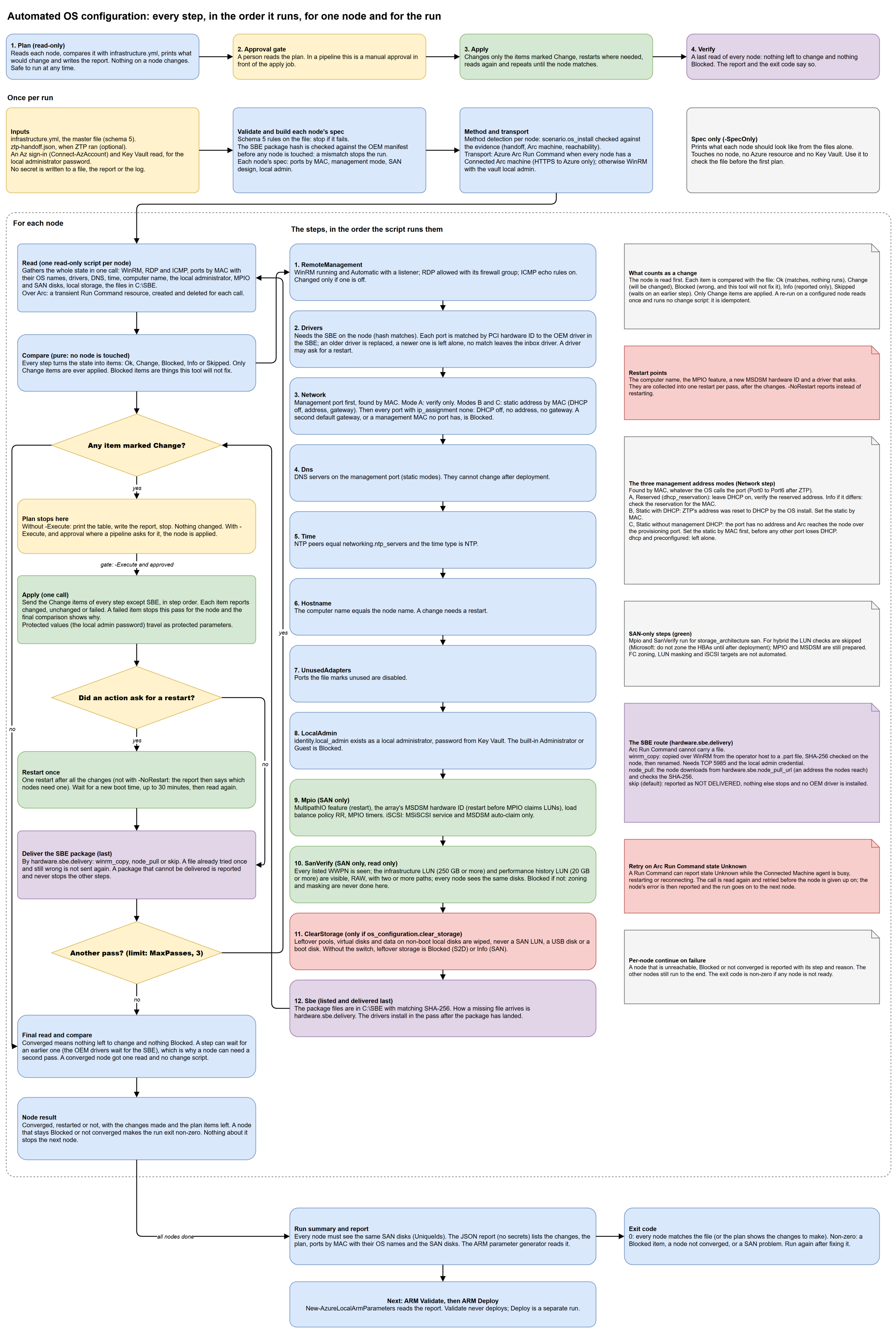
Select the diagram to open it full screen and zoom. The full walk-through of every step is on How the run works.
Prerequisites
| Requirement | Detail |
|---|---|
| The OS is installed | By azurelocal-ztp (ended at the Handoff) or by hand. See Which method did I use? |
| A filled-in master file | infrastructure.yml, schema 5, kept outside any repository clone if it holds environment data. Keys below |
| The ZTP handoff (ZTP route) | <run>.ztp-handoff.json, schema 2. Optional: without it the Arc machines are found by name in azure.resource_group |
| The SBE (if you want the OEM drivers) | The OEM's folder, named by hardware.sbe.bundle_path, and a delivery route. See the SBE delivery route |
| Operator host | PowerShell 7.4 or later, powershell-yaml, Az.Accounts (and Az.KeyVault for the keyvault:// secrets), signed in with Connect-AzAccount |
| Access | The roles and network paths in Access and connectivity |
Check the file first. This reads only the files (and the SBE folder) and touches no node, no Azure resource and no Key Vault:
./scripts/deploy/04-cluster-deployment/phase-03-os-configuration/Set-AzureLocalNodeConfiguration.ps1 `
    -InfrastructureFile ./infrastructure.yml -SpecOnly
Run it standalone
Step 1: Plan
The plan reads every node and prints a table of what would change. Nothing on a node changes.
Connect-AzAccount -Tenant <tenant-id>

./scripts/deploy/04-cluster-deployment/phase-03-os-configuration/Invoke-AzureLocalOsConfiguration.ps1 `
    -InfrastructureFile ./infrastructure.yml `
    -HandoffFile ./ztp-handoff.json `
    -Mode Plan
Read the table. Each row is one item on one node: the step, the item, what the node has now, what the file wants and the action. Ok means it matches and nothing will run. Change will be changed. Blocked is wrong and the tool will not fix it. Info is reported only. Skipped waits on an earlier step.
Look in particular for:
- the method detected for each node, and any mismatch with
scenario.os_install; - the management address, by mode:
Averified,BorCset by MAC; - with
os_configuration.clear_storage: true, the list of disks per node that would be wiped; - any Blocked row. Fix its cause now; apply will not clear it.
Step 2: Approve
A person reads the plan. When you run by hand, this is you. In a pipeline it is the approval on the apply job.
Step 3: Apply
./scripts/deploy/04-cluster-deployment/phase-03-os-configuration/Invoke-AzureLocalOsConfiguration.ps1 `
    -InfrastructureFile ./infrastructure.yml `
    -HandoffFile ./ztp-handoff.json `
    -Mode Apply `
    -ReportPath ./os-configuration-report.json
Apply changes only the items marked Change, in step order, restarts a node once when an action asks for it, delivers the SBE package last, reads the node again and repeats until it matches (at most three passes). Then a verification pass reads every node once more.
To limit a run, add -Node <name>[,<name>]. To keep nodes from restarting, add -NoRestart: the report then says which nodes need one.
Step 4: Verify
A good run ends with every node matching the file and exit code 0. The JSON report (no secrets) lists the changes made, the final plan, the ports by MAC with their OS names, and the SAN disks. The ARM parameter generator reads it.
Run apply again at any time. On a node that matches, it changes nothing.
From a pipeline
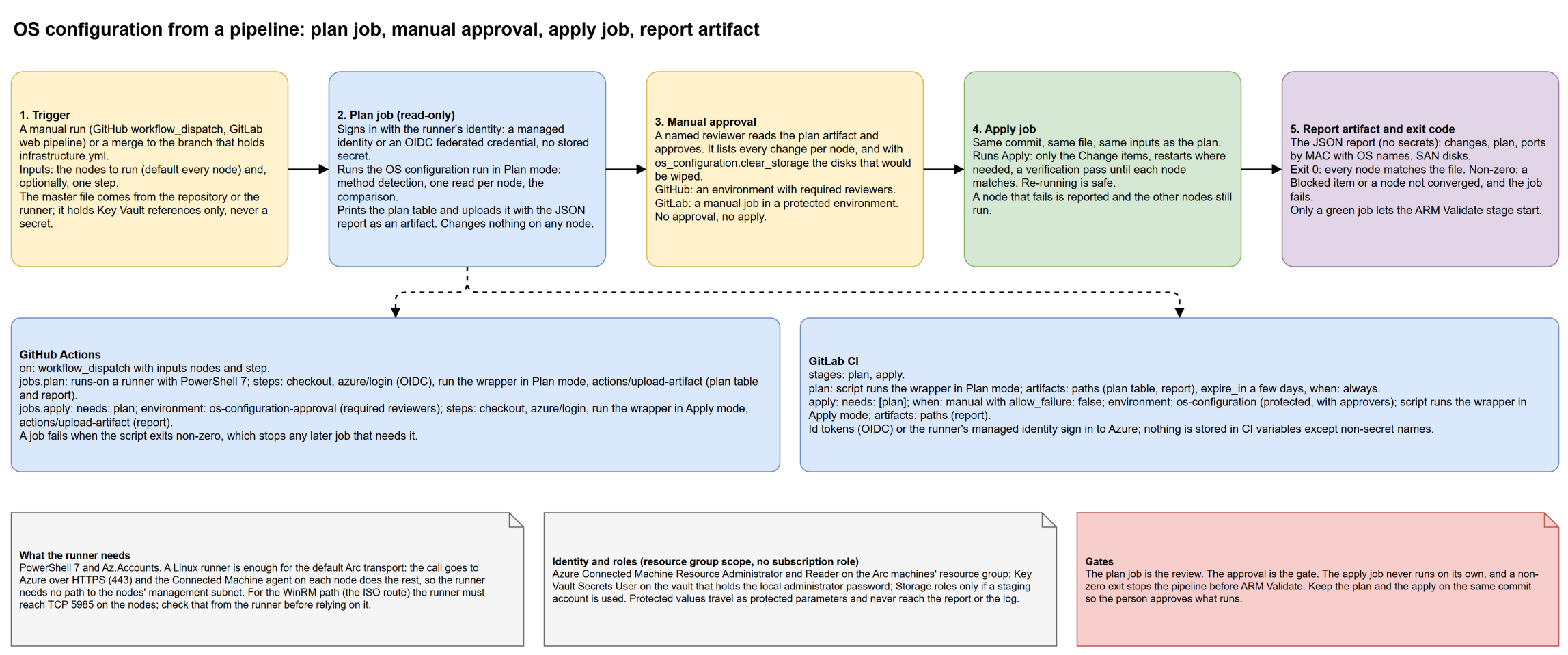
Select the diagram to open it full screen and zoom. The shape is the same on both platforms: a plan job, a manual approval, an apply job, and a report artifact.
| GitHub Actions | GitLab CI | |
|---|---|---|
| Trigger | workflow_dispatch with the nodes and an optional step as inputs | A web pipeline with the same inputs as variables, or a merge to the branch |
| Plan | jobs.plan: checkout, azure/login with OIDC, the wrapper in Plan mode, actions/upload-artifact for the plan table and report | Stage plan: the wrapper in Plan mode, artifacts: paths, when: always |
| Approval | jobs.apply bound to an environment with required reviewers | Stage apply with when: manual and allow_failure: false, in a protected environment with approvers |
| Apply | jobs.apply, needs: plan: the wrapper in Apply mode | Stage apply, needs: [plan]: the wrapper in Apply mode |
| Report | actions/upload-artifact | artifacts: paths |
| Stop on failure | A non-zero exit fails the job, so a later job that needs it does not start | A non-zero exit fails the job and the stage |
Rules that matter more than the syntax:
- Keep the plan and the apply on the same commit. The person approves what will run.
- No secret in the pipeline. The runner signs in with a managed identity or an OIDC federated credential. The local administrator's password stays in Key Vault and travels as a protected parameter.
- The apply job never runs on its own. Without approval there is no apply.
- Gate ARM on the exit code. Start ARM Validate only after the apply job is green.
Linux runner notes
- The wrapper is PowerShell 7. A Linux runner with PowerShell 7,
powershell-yamlandAz.Accountsis enough for the Arc Run Command transport, because that path is HTTPS from the runner to Azure and needs no route to the nodes. Prove it on your runner image first with-SpecOnly, which touches nothing. - The WinRM transport (the ISO route) needs a route to TCP 5985 on the nodes and PowerShell remoting from the runner to Windows. Test that from the runner before you rely on it; remoting from Linux needs extra packages for Negotiate authentication. If the runner is in Azure and the nodes are on-premises, the network path is the same VPN question as for azurelocal-ztp's runner.
- azurelocal-ztp itself needs a Windows runner on the management network. OS configuration does not.
The master-file keys it uses
All keys are in the master infrastructure.yml. See the variables reference for the full description of every key. Values here are placeholders.
| Key | What the run does with it |
|---|---|
scenario.os_install | iso or simplified: the declared method, checked against the evidence |
scenario.storage_architecture | s2d, san or hybrid: decides whether the SAN steps run and whether leftover storage is Blocked |
azure.subscription_id, azure.resource_group | Where the Arc machines are found |
nodes[].name, nodes[].arc_machine_name | The computer name to set, and the Arc machine to reach (default: the node name) |
nodes[].network_adapters[] | Every port by mac_address, with roles, ip_assignment (static, dhcp_reservation, dhcp, preconfigured, none), ip_address and prefix_length. The management port is the one with role management |
networking.management.subnet, .gateway, .dns_servers, .vlan_id | The prefix, the gateway and DNS for the management port. The VLAN is reported, not set |
networking.ntp_servers | The NTP peers |
identity.local_admin.username, .password | The deployment's local administrator and its keyvault:// password reference. Not Administrator or Guest |
key_vaults[] | The vault that holds the password |
hardware.vendor | Picks the OEM definition (config/oem/<vendor>.json) for the driver folders |
hardware.sbe.bundle_path | The folder with the OEM's SBE as downloaded. Without it the SBE and the OEM drivers are skipped |
hardware.sbe.delivery, hardware.sbe.node_pull_url | How the SBE reaches each node. See below |
storage.san.*, nodes[].san.hbas[].ports[].wwpn | SAN only: array, LUN IDs and the expected WWPNs |
os_configuration.clear_storage | true wipes leftover local storage on re-used machines. Default false |
provisioning.os_version | Compared with the installed build in the handoff; a difference is reported |
The SBE delivery route
The OEM's drivers come from the SBE, and the SBE has to be in C:\SBE on every node. Azure Arc Run Command cannot carry a file, so how the package reaches a node is a choice you make in the file:
hardware.sbe.delivery | What happens |
|---|---|
winrm_copy | The run copies the files over WinRM from the host running it to a .part file on the node, checks the SHA-256 there, then renames it. The host needs a route to TCP 5985 on the nodes and the local administrator credential |
node_pull | The node downloads the files from hardware.sbe.node_pull_url, an address the nodes can reach (not necessarily the operator host), and checks the SHA-256 |
skip (default) | Nothing is delivered. The run reports the package as not delivered, installs no OEM driver, and carries on with every other step |
The package's hash is checked against the OEM's manifest before any node is touched. The SBE is delivered last, and the OEM drivers install in the pass after the package has landed, which is why a node can need a second pass. A file that was delivered once and is still wrong is not sent again; the failure stays in the report.
clear_storage
A re-used machine can carry storage pools, virtual disks and data from an earlier deployment. Validate rejects disks that are not clean. os_configuration.clear_storage decides what the run does:
clear_storage | Leftover local storage |
|---|---|
false (default) | Reported. Blocked on a Storage Spaces Direct design; Info on a SAN design. Nothing is wiped |
true | Wiped in apply only: storage pools, virtual disks and the data on local disks that are not boot, system, SAN or USB |
The plan lists the disks per node before anything is wiped, and apply wipes only what the plan listed. SAN LUNs, USB disks and boot or system disks are never touched. In a pipeline, that list is what the approver reads. Set it true only for machines you mean to re-use.
Exit codes
| Exit code | Meaning |
|---|---|
0 | A plan finished and listed the changes to make, or an apply finished and every node matches the file |
| non-zero | Not ready: a Blocked item, a node that did not converge, a SAN problem (the nodes do not see the same disks), or a node the run could not reach. The report names the node, the step and the reason |
Treat any non-zero exit as "do not go on to ARM Validate". A run is safe to repeat after you fix the cause.
The existing step-runner returns 1 for "not ready". The wrapper may separate more cases (file invalid, node unreachable, method mismatch). The rule above holds for all of them; read the report for the reason.
Access and connectivity
This is a summary. The cross-tool matrix, with every source cited, is the toolkit's access-and-connectivity page. All addresses are documentation examples.
Roles
| Who | Role | Scope | Why |
|---|---|---|---|
| The operator or the runner identity | Azure Connected Machine Resource Administrator | The Arc machines' resource group | Create, read and delete the Run Command that carries each node script |
| the same | Reader | the same resource group | Find the machines by name and read their status |
| the same | Key Vault Secrets User (RBAC vault), or an access policy with get | The vault that holds identity.local_admin.password | Read the local administrator's password |
| the same | Storage Blob Data Contributor and Storage Blob Delegator | A staging storage account | Only if you stage files that way; the default SBE routes need none |
| Whoever registered the machines | Azure Connected Machine Onboarding and Azure Connected Machine Resource Administrator | The resource group | Done by ZTP or by hand before this step |
The runner holds resource-group-scope roles only, never a subscription role. The Azure resource providers (Microsoft.HybridCompute and the rest) are registered once by the subscription owner in Azure foundation, Phase 02: resource providers.
Network paths
| From | To | Port | Used for |
|---|---|---|---|
| Operator host or runner | Azure (management.azure.com, login.microsoftonline.com, *.vault.azure.net) | TCP 443 | Every step: sign-in, Arc Run Command, Key Vault |
| Operator host or runner | aka.ms | TCP 443 | The OEM's SBE manifest (skip with -OfflineManifest) |
| The nodes | Azure | TCP 443 and 80, no HTTPS inspection | The Connected Machine agent must stay Connected (version 1.33 or later) for Arc Run Command |
| Operator host or runner | The nodes' management subnet | WinRM TCP 5985 or 5986 | Only for the WinRM transport (the ISO route) and for winrm_copy |
| The nodes | The SBE location | HTTPS | Only for node_pull |
With the default Arc transport the operator host needs no path to the nodes. The Run Command extension must not be blocked (azcmagent config get extensions.blocklist on a node), and Azure Policy with deployIfNotExists or modify effects on the resource group can collide with it; the toolkit has a script that creates temporary exemptions.
Troubleshooting
| Symptom | Likely cause | What to do |
|---|---|---|
| A node's Run Command ends with state Unknown, or the read times out | The Connected Machine agent is busy, restarting (after a driver or MPIO restart), or briefly disconnected. The run polls the Run Command resource and a state that never becomes Succeeded, Failed, TimedOut or Canceled is not a result | Wait for the Arc machine to show Connected again, then run again; a completed step is skipped because the node is read first. If it repeats, check the agent version (1.33 or later), azcmagent config get extensions.blocklist, the node's route to Azure on 443 and Azure Policy on the resource group |
Not signed in to Azure | No Az context | Connect-AzAccount. The sign-in message names the role it needs |
403 or "Authorization failed" creating the Run Command | Missing Azure Connected Machine Resource Administrator on the Arc machines' resource group | Add the role. The run does not check roles up front |
| A node reports Blocked: no adapter has the management MAC | The MAC in nodes[].network_adapters[] is wrong, or the port is down | Compare the file with the node's ports (the plan lists every port by MAC with its OS name). Fix the file |
| Blocked: a second default gateway | A port the file lists as dhcp or dhcp_reservation, or a port the file does not list, holds a gateway | List the port with ip_assignment: none, or remove the gateway. Validate fails with more than one |
| Management address is wrong after ZTP (Modes B or C) | The OS install reset it. This is expected | Apply sets it by MAC. In Mode C the management port is handled first so the node keeps a way out |
| SBE package NOT delivered | hardware.sbe.delivery is skip, winrm_copy has no WinRM route or no credential, or node_pull_url is empty or unreachable from the node | Set the delivery route. Nothing else stops; the OEM drivers wait for the package |
| A node did not come back after a restart | The restart wait is 30 minutes for a new boot time | Check the console (BMC) for the node. Run again once it is Connected |
| Blocked: leftover storage on an S2D design | The machine was used before | Set os_configuration.clear_storage: true for it, read the disk list in the plan, and apply. Or wipe by hand: Task 11 |
| Blocked: a SAN LUN is not visible, is not RAW or has one path | Zoning or LUN masking is not done, or a LUN was initialised | Fix it on the fabric and the array. The run never changes either. Task 14 |
| The nodes don't see the same SAN disks | Masking differs between nodes | Present the same LUNs with the same IDs to every node |
| Method mismatch for a node | scenario.os_install disagrees with the evidence | Which method did I use?, then correct the file or the node |
| The plan changes something every time | An item cannot reach its desired state (for example DNS set by DHCP again) | Read the item's note in the plan; check for a competing policy or a DHCP setting |
Validation
-
-SpecOnlyprinted what you expect for every node - The plan shows no Blocked item, and the method is the one you expect for each node
- If
clear_storageistrue, the disk list is exactly the disks you mean to wipe - The apply ended with exit code
0and every node matches the file - The report was written and kept (it holds no secrets)
- Active Directory (or local identity) is ready before ARM Validate
Navigation
| ← Which Method Did I Use? | ↑ Phase 03: OS Configuration | How the run works → |
References
- azurelocal-toolkit: OS configuration and ARM deployment
- azurelocal-toolkit: access and connectivity
- azurelocal-toolkit: master file variables
- Microsoft Learn: Run command on Azure Arc-enabled servers
- Microsoft Learn: Assign required permissions for Azure Local deployment
| Version | Date | Author | Changes |
|---|---|---|---|
| 1.0 | 2026-11-07 | Azure Local Cloud | Initial release |