Commvault Migration Path — Architecture
Detailed component diagram and data flow for the Commvault two-hop migration.
Component Diagram
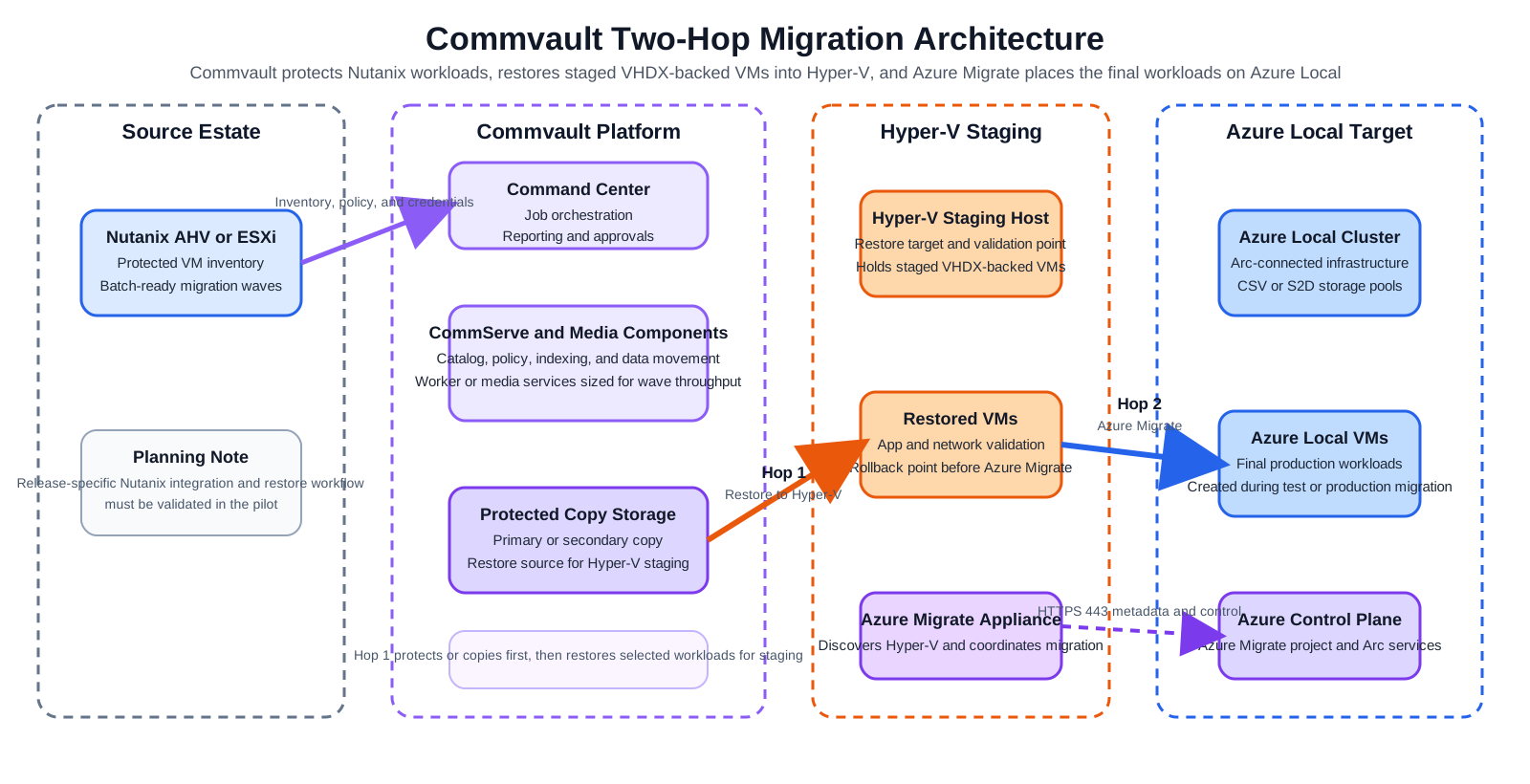
Draw.io source: 03-commvault-architecture-detailed.drawio
Data Flow — Hop 1 (Commvault)
=== "Nutanix AHV"
1. Commvault discovers Nutanix workloads through the supported Nutanix integration path for your release.
2. Protection jobs create the required protected copy on Commvault-managed storage.
3. For cutover, Commvault restores the protected VM to Hyper-V staging as a VHDX-backed VM.
4. Post-restore network settings, DNS, and workload validation occur on the Hyper-V staging host.
=== "Nutanix ESXi"
1. Commvault connects through the VMware integration path for ESXi-on-Nutanix sources.
2. Protection or copy jobs create the restore point on Commvault-managed storage.
3. Restored workloads are written to Hyper-V staging as VHDX-backed VMs.
4. The staging host becomes the Azure Migrate source for Hop 2.
Data Flow — Hop 2 (Azure Migrate)
Same as the other two-hop paths:
- Azure Migrate appliance discovers the staged Hyper-V VMs
- Replicates VHDX disks to Azure Local CSV storage
- Performs test migration and production cutover to create Azure Local VMs
Key Architecture Difference vs. Veeam and HYCU
| Aspect | Commvault | HYCU | Veeam |
|---|---|---|---|
| Operating model | Policy-driven enterprise data platform | Purpose-built Nutanix backup appliance | Replication-first virtualization platform |
| Hop 1 behavior in this repo | Protect/copy then restore | Backup then restore | Live replication |
| Staging storage need | Protected copy plus Hyper-V staging | Backup target plus Hyper-V staging | Hyper-V staging only |
| Re-IP model | Scripted or operational post-restore | Scripted post-restore | Built-in re-IP |
Diagrams
Commvault-specific rendered diagrams are available in the Diagrams Gallery. Use the common two-hop diagrams in the same gallery for the shared Azure Migrate Hop 2 pattern.