HYCU Migration Path — Architecture
Detailed component diagram and data flow for the HYCU two-hop migration.
Component Diagram
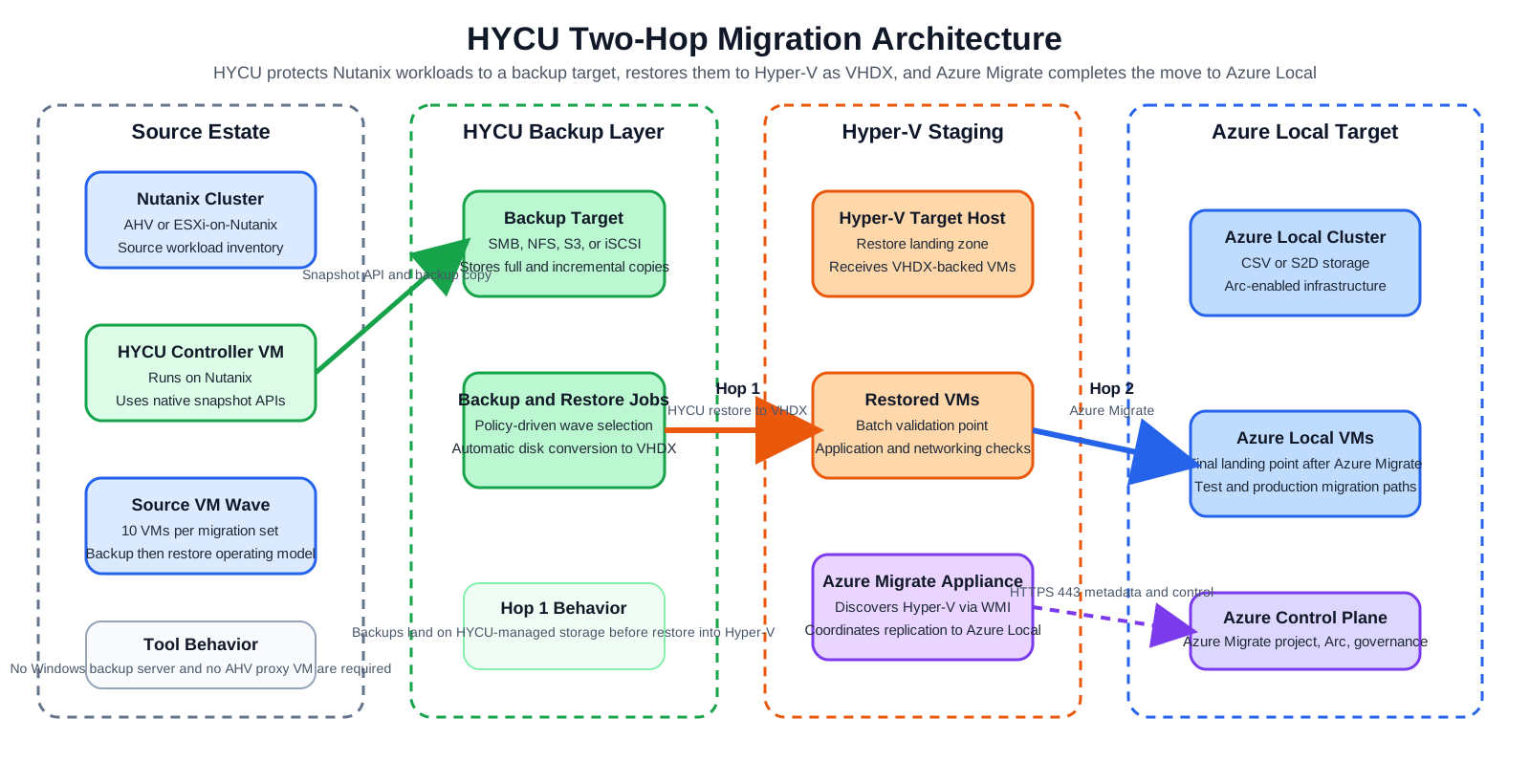
Draw.io source: 02-hycu-architecture-detailed.drawio
Data Flow — Hop 1 (HYCU)
=== "Nutanix AHV"
1. HYCU Controller VM connects to Prism Element (HTTPS 9440)
2. HYCU triggers a **native AHV snapshot** via the AHV v3/v4 snapshot API
3. Backup data is streamed from the Nutanix cluster → HYCU Controller → Backup Target
4. **No AHV Proxy VM is deployed** — HYCU reads directly via the API
5. For incrementals, only Changed Block Tracking (CBT) deltas are transferred
6. **Restore to Hyper-V**: HYCU reads from the Backup Target and writes **VHDX** files to the Hyper-V staging host via WinRM. Disk format conversion (AHV → VHDX) is automatic.
=== "Nutanix ESXi"
1. HYCU connects to vCenter/ESXi (HTTPS 443) via the vSphere API
2. HYCU triggers VMware snapshots and reads CBT-tracked changes
3. Data is stored on the HYCU Backup Target
4. **Restore to Hyper-V**: HYCU restores from backup target as VHDX (VMDK → VHDX conversion is automatic)
Data Flow — Hop 2 (Azure Migrate)
Same as the Veeam path — Azure Migrate is tool-agnostic for Hop 2:
- Azure Migrate appliance discovers VMs on Hyper-V via WMI
- Replicates VHDX files to Azure Local CSV storage
- At cutover: final delta, Azure Migrate creates Azure Local VMs on Azure Local
Key Architecture Difference vs. Veeam
| Aspect | HYCU | Veeam |
|---|---|---|
| Backup storage | Requires separate backup target | Not needed — direct replication |
| AHV footprint | Controller VM only (on cluster) | AHV Proxy VM (auto-deployed on cluster) |
| Data path | AHV → Target → Restore to HV | AHV → Direct replication to HV |
| Re-IP | Post-restore scripting required | Built-in at failover time |
Diagrams
See the Diagrams Gallery for architecture diagrams including: