Tool Comparison
Compare migration tools to choose the right path for your environment.
Primary Tool Comparison
| Aspect | Veeam B&R | HYCU | Commvault | Carbonite Migrate |
|---|---|---|---|---|
| Deployment model | Dedicated Windows Server + SQL Express | Single Linux VM on Nutanix cluster | Commvault control plane plus media or worker components | Carbonite management server + agent on source and target VMs |
| Source coverage | AHV + ESXi | AHV + ESXi | AHV + ESXi as a planning assumption; validate against your release and licensed modules | Hypervisor-agnostic at OS level (AHV, ESXi, Hyper-V, physical) |
| AHV integration | Prism API + temporary AHV proxy | Native AHV snapshot API | Nutanix and VMware integration depends on the selected Commvault workflow | No AHV API dependency |
| Agent requirement | Agentless (NGT optional for re-IP) | Agentless | Often agentless for VM protection, but guest agents may be used for some workloads | Agent-based on both source and target |
| Migration workflow | Live replication to Hyper-V staging | Backup then restore to Hyper-V staging | Protect or copy, then restore to Hyper-V staging | Continuous OS-level replication into pre-provisioned target VM |
| Cutover/downtime profile | Low downtime (final sync + failover) | Moderate downtime (restore/final sync window) | Moderate downtime (restore/final sync window) | Low downtime (final delta sync + cutover) |
| Re-IP/network handling | Built-in re-IP rules | Script-driven post-restore | Scripted or operationally managed post-restore | Typically handled via DNS/LB update and OS config |
| Storage overhead during migration | Hyper-V staging copy | Backup repository + staging copy | Secondary copy or dedupe target plus staging copy | Target-side replicated copy (no separate backup repository required) |
| Performance impact on source | Moderate during initial sync, low during incrementals | Moderate during backup windows | Moderate during initial protection and copy windows | Moderate CPU/network impact from agent-based replication |
| Management UX | Rich desktop console + web components | Simple web UI | Command Center and administrative consoles | Carbonite console |
| Licensing model | VUL per workload | Per-VM/per-socket subscription | Subscription or platform licensing depending estate | Licensed product (typically per workload/server) |
| Operational complexity | Medium-high | Low-medium | Medium-high | Medium |
| Best fit | Larger waves, granular control, existing Veeam investment | Teams that prioritize simplicity and AHV-native workflows | Existing Commvault estates that want policy-driven operations and reuse of existing tooling | Mixed or legacy environments needing hypervisor-independent migration |
| Main limitations | More moving parts to deploy/manage | Two-step workflow can increase staging/storage overhead | Exact capabilities vary by release, module, and source connector | Requires agents and careful change-control on guest OS |
When to Choose Each Tool
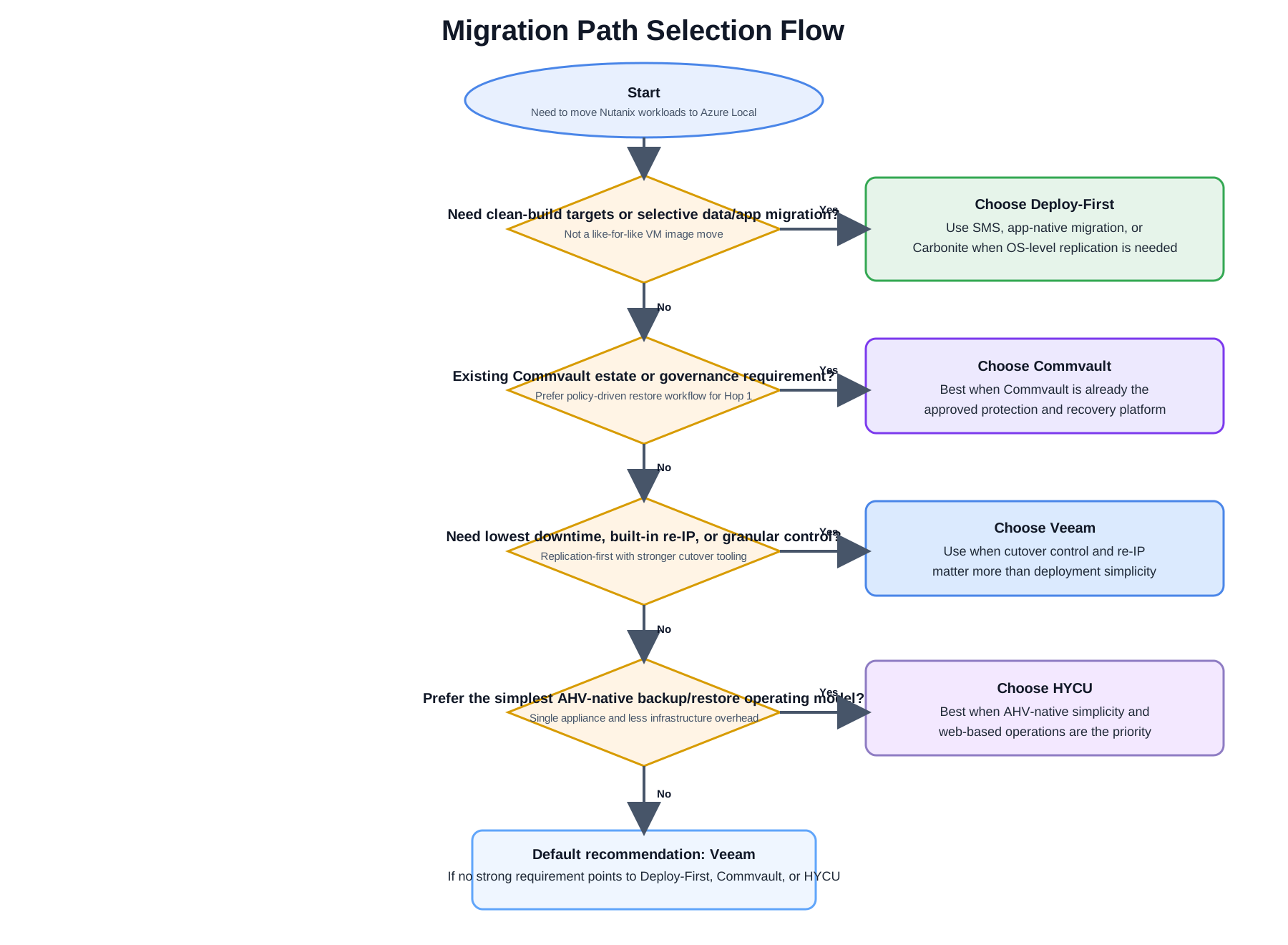
Draw.io source: migration-diagrams-tool-selection-flow-four-path.drawio
Choose Veeam if:
- You already have a Veeam Universal License investment
- You need built-in re-IP rules (source and target are on different subnets)
- You need live continuous replication (lowest RPO possible)
- You want the most granular control over replication scheduling, bandwidth throttling, and job management
- Your team has existing Veeam expertise
Choose HYCU if:
- You want the simplest possible deployment (single VM on Nutanix, no Windows server)
- Your source is AHV-native and you want zero agent/proxy overhead on the Nutanix cluster
- Backup/restore RPO (daily or more frequent incrementals) is acceptable for your workloads
- You prefer HYCU's web-based management console
- Per-VM subscription licensing matches your procurement model
Choose Commvault if:
- You already operate Commvault and want to reuse that investment for migration staging
- Your team prefers policy-driven job control, centralized governance, and common reporting across backup and migration operations
- A restore-based Hop 1 workflow is acceptable for your downtime model
- You are prepared to validate the exact Nutanix and Hyper-V workflow against your licensed Commvault modules before production
Choose Carbonite if:
- You need a hypervisor-independent option for mixed or legacy estates
- Source hypervisor/API constraints make agentless approaches difficult
- You are following a deploy-first model with pre-built Azure Local target VMs
- You can support agent deployment and change-control across source VMs
- You want continuous replication with low cutover downtime but not a hypervisor-native toolchain
Choose Deploy-First if:
- You want clean-build Azure Local VMs instead of a like-for-like image migration
- You plan to migrate only data, application state, or selected OS state into pre-provisioned targets
- Carbonite is needed as a sub-option inside that build-first model rather than as the primary path
Hop 2 (Common): Azure Migrate
All scenarios in this documentation use Azure Migrate for Hop 2 (Hyper-V → Azure Local). Azure Migrate is the recommended path because it:
- Provides Arc registration as part of the migration — VMs arrive already integrated with Azure
- Handles VHDX format validation and Azure Local compatibility checks
- Offers a test migration capability before production cutover
- Tracks migration status in the Azure portal
- Is free (no additional licensing beyond Azure Local infrastructure costs)