Migration Phases
Common phases for two-hop migration scenarios (Veeam, HYCU, or Commvault in Hop 1, Azure Migrate in Hop 2).
Phase Overview
Every two-hop migration from Nutanix to Azure Local follows the same high-level phases. The specific steps within each phase vary by tool, but the workflow is consistent.
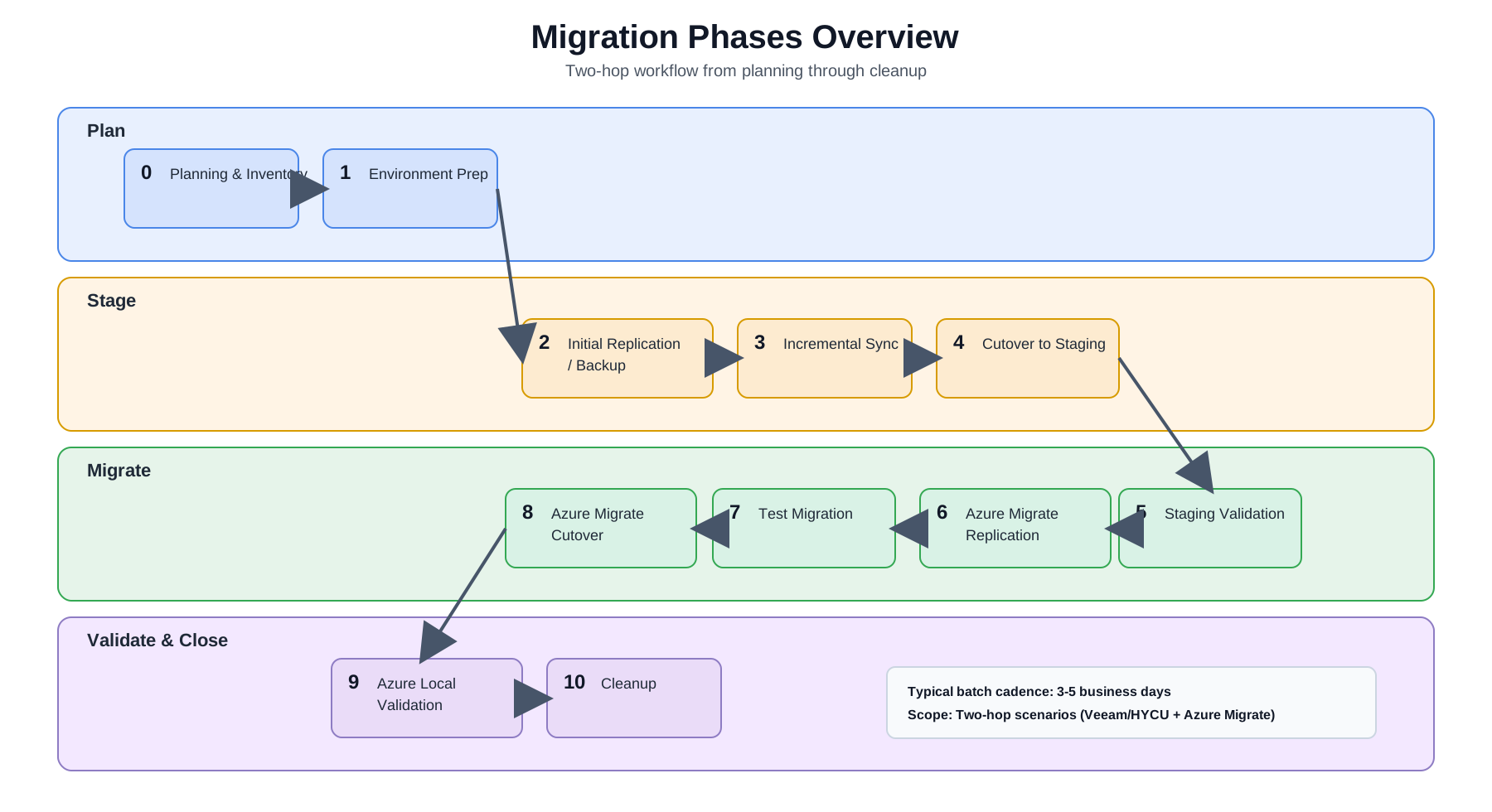
Draw.io source: migration-diagrams-phases-overview.drawio
| Phase | Name | Key Activities |
|---|---|---|
| 0 | Planning & Inventory | VM inventory, batch planning, network mapping, stakeholder alignment |
| 1 | Environment Preparation | Provision staging hosts, install tools, configure sources and targets |
| 2 | Initial Replication / Backup | Full copy of VMs from Nutanix to staging Hyper-V |
| 3 | Incremental Sync | Ongoing delta syncs to keep replicas/backups current |
| 4 | Cutover | Final sync, source VM shutdown, staging VM promotion |
| 5 | Staging Validation | Validate VMs on Hyper-V: boot, network, applications, DNS |
| 6 | Azure Migrate Replication | Replicate VHDX disks from Hyper-V to Azure Local CSV storage |
| 7 | Test Migration | Test failover to isolated network on Azure Local |
| 8 | Azure Migrate Cutover | Create production Azure Local VMs |
| 9 | Azure Local Validation | Full application validation on Azure Local |
| 10 | Cleanup | Delete staging VMs, decommission source VMs, free licenses |
Phase 0 — Planning & Inventory
Before any migration work begins:
- VM Inventory: Export a full list of VMs from Prism (AHV) or vCenter (ESXi). Document OS, vCPU, RAM, used disk, running services, IP addresses, DNS names, and AD membership for every VM.
- Batch Planning: Organize VMs into batches of 8–10. Group by application affinity (keep coupled VMs together), disk size (predictable storage), and criticality (migrate dev/test first).
- Network Mapping: Document source VLANs and subnet mappings for every VM. Decide on the IP strategy — preserve IPs (same VLAN) vs. re-IP (new subnet). Pre-stage DNS changes with low TTL (300 seconds).
- Dependency Mapping: Identify inter-VM dependencies. Co-migrate tightly coupled VMs in the same batch.
- Stakeholder Alignment: Get maintenance windows approved. Define rollback criteria.
TIP
Start with a PoC Before migrating production VMs, run the Proof of Concept plan to validate tool selection and staging option for your specific environment.
Phase 1 — Environment Preparation
These preparation steps apply to two-hop scenarios with a Hyper-V staging layer.
- Provision the Hyper-V staging host(s) with appropriate storage (1–5 TB depending on batch sizes)
- Install and license the migration tool for the selected path (Veeam, HYCU, or Commvault)
- Add Nutanix cluster as a source in the tool
- Add Hyper-V host(s) as a target in the tool
- Create the Azure Migrate project in the Azure portal
- Deploy the Azure Migrate appliance VM on the Hyper-V staging host
- Register the appliance with the Azure Migrate project
- Verify network connectivity: Nutanix → staging → Azure Local → Azure (outbound HTTPS 443)
- Verify Azure Local cluster health and available CSV capacity
Phase 2 — Initial Replication / Backup
- Create migration jobs/policies for the first batch (8–10 VMs)
- Run the initial full replication or full backup
- Monitor progress and verify completion
- Time varies by VM disk size and network bandwidth — plan for 4–24 hours per batch on first run
Phase 3 — Incremental Sync
- Allow incremental syncs to run on schedule (daily or more frequent)
- Monitor for errors and resync as needed
- The longer this phase runs, the smaller the final cutover delta will be
Phase 4 — Cutover
- Notify stakeholders — maintenance window begins
- Trigger a final incremental sync/backup
- Power off source VMs on Nutanix
- Run one more sync/backup to capture final dirty blocks
- Fail over or restore the VMs to Hyper-V staging using the selected tool
- Proceed to Phase 5
WARNING
Do not delete source VMs Source VMs on Nutanix are your rollback point throughout the entire pipeline. Do NOT decommission them until VMs are fully validated on Azure Local.
Phase 5 — Staging Validation
For each VM in the batch:
- [ ] VM boots successfully on Hyper-V
- [ ] Network connectivity: ping gateway, ping DNS server
- [ ] DNS resolution:
nslookup <hostname>resolves to correct IP - [ ] AD domain membership:
Test-ComputerSecureChannelor check in ADUC - [ ] Application smoke test: web server responds, database accepts connections, etc.
- [ ] Windows/Linux services are running as expected
Phase 6 — Azure Migrate Replication
- In the Azure Migrate project, select the current batch of VMs on Hyper-V for replication (typically 8-10)
- Set target: Azure Local cluster + target CSV volume
- Configure VM names and network mapping
- Start replication — wait for Protected state (initial full copy complete)
- Time: 4–24 hours depending on disk size
Phase 7 — Test Migration
- Run a test failover for all VMs to an isolated network on Azure Local
- Repeat Phase 5 validation steps on the Azure Local test VMs
- Clean up test VMs after validation
Phase 8 — Azure Migrate Cutover
- Trigger Migrate for all VMs in the batch
- Azure Migrate performs a final delta sync and creates production Azure Local VMs
- Confirm VMs are visible in the Azure portal as Azure Local VMs
Phase 9 — Azure Local Validation
Full validation of production VMs on Azure Local:
- [ ] All Phase 5 checks pass on Azure Local
- [ ] Azure Local VM resource status shows healthy/connected in the Azure portal
- [ ] Azure Monitor agents are reporting
- [ ] Update Manager shows the VM
- [ ] Application team sign-off
Phase 10 — Cleanup
Once the batch is fully validated on Azure Local:
- Delete staged VMs from the Hyper-V staging host (free storage for the next batch)
- Delete Veeam replicas or HYCU backup policies for this batch
- Decommission source VMs on Nutanix (power off, then delete after a holding period)
- Begin the next batch
Batch Timing Estimate
| Activity | Estimated Duration |
|---|---|
| Initial replication/backup | 4–24 hours |
| Incremental sync period | 1–7 days |
| Cutover window | 30–90 minutes |
| Staging validation | 2–4 hours |
| Azure Migrate replication | 4–24 hours |
| Test migration + validation | 2–4 hours |
| Azure Migrate cutover | 30–60 minutes |
| Azure Local validation | 2–4 hours |
| Total per batch | 3–5 business days |
With 1–2 batches per week, a 300-VM migration completes in 15–30 weeks (4–8 months).