Veeam Migration Path — Architecture
Detailed component diagram and data flow for the Veeam two-hop migration.
Component Diagram
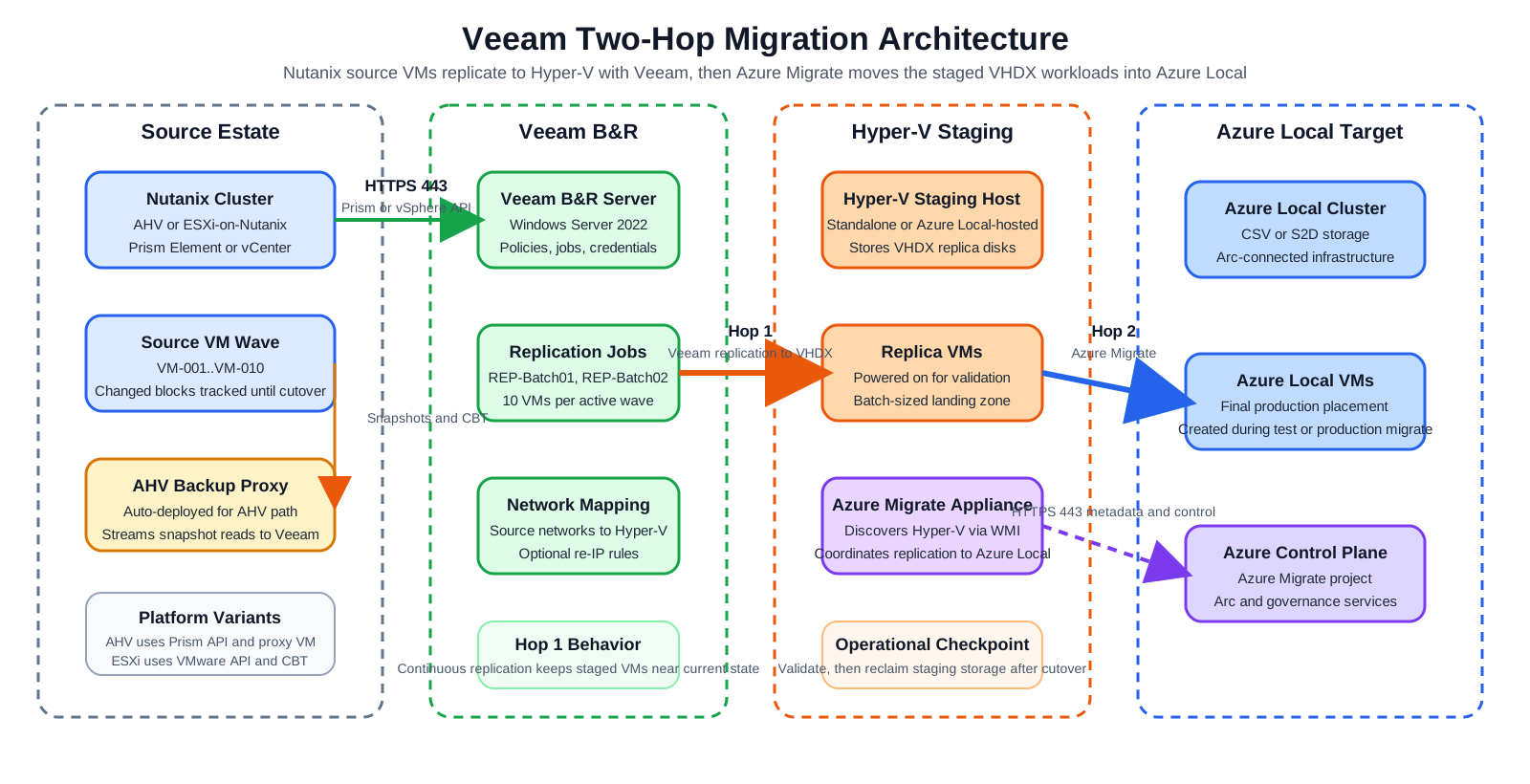
Draw.io source: 01-veeam-architecture-detailed.drawio
Data Flow — Hop 1 (Veeam)
=== "Nutanix AHV"
1. Veeam connects to Prism Element API (HTTPS 443)
2. Veeam deploys and communicates with the **AHV Backup Proxy VM** on the Nutanix cluster
3. The proxy triggers a Nutanix snapshot via the AHV API (Changed Block Tracking)
4. Snapshot data is streamed from the AHV proxy → Veeam server → Hyper-V staging host
5. Veeam writes the data as a **VHDX** file on the Hyper-V host at the configured replica path
6. For incrementals, only changed blocks (CBT) are transferred
=== "Nutanix ESXi"
1. Veeam connects to vCenter/ESXi (HTTPS 443) via vSphere API
2. Veeam triggers a VM snapshot and uses VMware **Changed Block Tracking (CBT)**
3. Data is read directly from the VMware datastore via NBD or SAN transport
4. Data is written as **VHDX** on the Hyper-V staging host
5. Incrementals use CBT — only changed blocks transferred
Data Flow — Hop 2 (Azure Migrate)
- Azure Migrate appliance connects to the Hyper-V host via WMI and discovers VMs
- For each VM, Azure Migrate reads the VHDX file and replicates it to Azure Local CSV storage over SMB/HTTPS
- Once initial replication is complete (Protected state), delta syncs run on a schedule 4. At cutover, a final delta sync runs, then Azure Migrate creates the Azure Local VM on Azure Local 5. VM is visible in the Azure portal through Azure Local integration
Batching Model
Timeline ──────────────────────────────────────────────────────────────────────►

Week 1-2:   [Batch 01: AHV → Veeam Replication → HV] [Validate] [Azure Migrate → AzL] [Validate] [Cleanup]
Week 3-4:   [Batch 02: ──────────────────────────────────────────────────────────────────────────────────]
Week 5-6:   [Batch 03: ──────────────────────────────────────────────────────────────────────────────────]
...
Only 1–2 batches are in-flight at any time. The Hyper-V staging host holds a maximum of 10–20 VMs at once.
Replica Naming
| Setting | Value |
|---|---|
| Replica suffix | _replica (default) or none if source VMs are powered off |
| Azure Migrate target name | Set to original VM name (no suffix) |
| Guest hostname | Unchanged throughout migration |
Diagrams
See the Diagrams Gallery for architecture diagrams including: