Veeam Migration Path — Architecture
Detailed component diagram and data flow for the Veeam two-hop migration.
Component Diagram
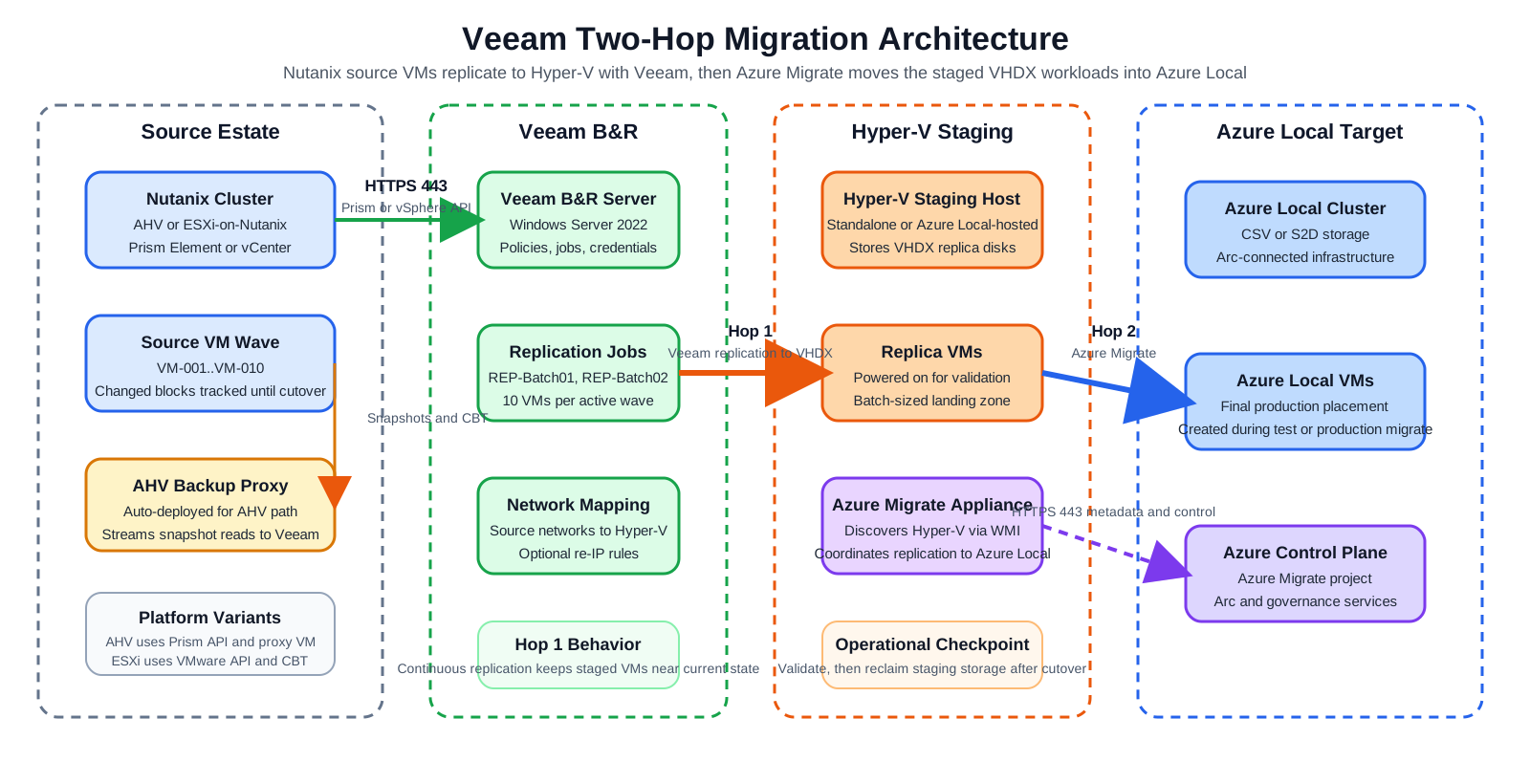
Draw.io source: 01-veeam-architecture-detailed.drawio
Data Flow — Hop 1 (Veeam)
- Veeam connects to Prism Element API (HTTPS 443)
- Veeam deploys and communicates with the AHV Backup Proxy VM on the Nutanix cluster
- The proxy triggers a Nutanix snapshot via the AHV API (Changed Block Tracking)
- Snapshot data is streamed from the AHV proxy → Veeam server → Hyper-V staging host
- Veeam writes the data as a VHDX file on the Hyper-V host at the configured replica path
- For incrementals, only changed blocks (CBT) are transferred
- Veeam connects to vCenter/ESXi (HTTPS 443) via vSphere API
- Veeam triggers a VM snapshot and uses VMware Changed Block Tracking (CBT)
- Data is read directly from the VMware datastore via NBD or SAN transport
- Data is written as VHDX on the Hyper-V staging host
- Incrementals use CBT — only changed blocks transferred
Data Flow — Hop 2 (Azure Migrate)
- Azure Migrate appliance connects to the Hyper-V host via WMI and discovers VMs
- For each VM, Azure Migrate reads the VHDX file and replicates it to Azure Local CSV storage over SMB/HTTPS
- Once initial replication is complete (Protected state), delta syncs run on a schedule
- At cutover, a final delta sync runs, then Azure Migrate creates the Azure Local VM on Azure Local
- VM is visible in the Azure portal through Azure Local integration
Batching Model
Timeline ──────────────────────────────────────────────────────────────────────►

Week 1-2:   [Batch 01: AHV → Veeam Replication → HV] [Validate] [Azure Migrate → AzL] [Validate] [Cleanup]
Week 3-4:   [Batch 02: ──────────────────────────────────────────────────────────────────────────────────]
Week 5-6:   [Batch 03: ──────────────────────────────────────────────────────────────────────────────────]
...
Only 1–2 batches are in-flight at any time. The Hyper-V staging host holds a maximum of 10–20 VMs at once.
Replica Naming
| Setting | Value |
|---|---|
| Replica suffix | _replica (default) or none if source VMs are powered off |
| Azure Migrate target name | Set to original VM name (no suffix) |
| Guest hostname | Unchanged throughout migration |
Diagrams
See the Diagrams Gallery for architecture diagrams including: