Architecture Overview
High-level architecture for migrating Nutanix workloads to Azure Local.
Source Platforms
This documentation covers migrations from two Nutanix source configurations:
=== "Nutanix AHV"
**Nutanix AHV** is Nutanix's native KVM-based hypervisor. VMs run as QCOW2/AHV disk images managed by Prism Element or Prism Central.

- Veeam connects via the Prism API and deploys a temporary AHV Backup Proxy VM on the cluster
- HYCU connects natively via the AHV snapshot API — no proxy VM needed
- Commvault can be positioned as a policy-driven Hop 1 option when your release and licensed modules support Nutanix protection and restore workflows
- Disk format: AHV (converted to VHDX during migration)
=== "Nutanix ESXi"
**Nutanix ESXi** runs VMware ESXi on Nutanix hardware with Nutanix managing the storage layer (AOS/AHV storage) while VMware manages the compute.

- Veeam connects via the vCenter/ESXi API — no special Nutanix integration needed
- HYCU supports ESXi as a source through the VMware vSphere API
- Commvault can use VMware-side integration for ESXi-based sources in the same two-hop model
- Disk format: VMDK (converted to VHDX during migration)
Two-Hop Architecture
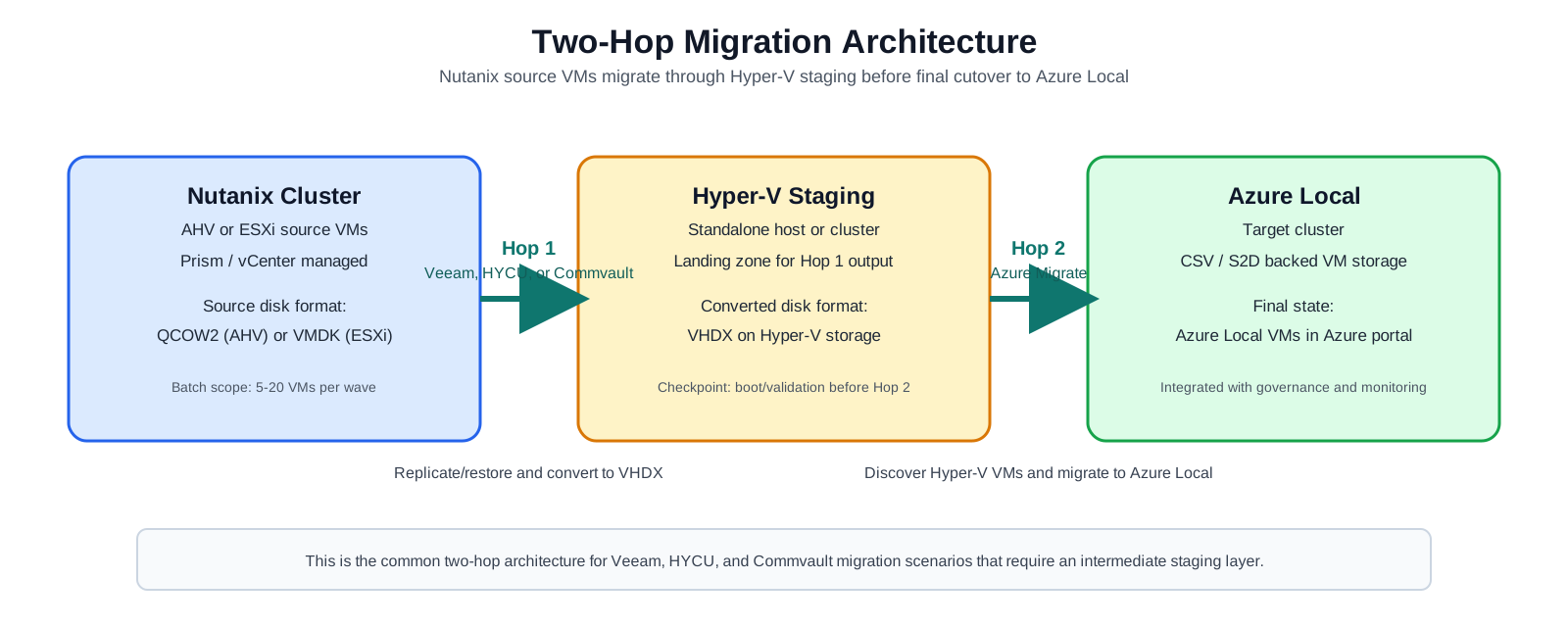
All scenarios that use an intermediate staging host follow this pattern:
Draw.io source: migration-diagrams-common-two-hop-detailed.drawio
Hop 1 — Veeam replication, HYCU backup/restore, or Commvault-led protection and restore converts the source disk format to VHDX and lands VMs on the Hyper-V staging host. This serves as both a format conversion step and a validation checkpoint.
Hop 2 — Azure Migrate discovers the VMs on Hyper-V, replicates their VHDX disks to Azure Local CSV storage, and promotes them to Azure Local VMs integrated with the Azure portal.
Staging Options
| Option | Description | Best For |
|---|---|---|
| Option A — Standalone Hyper-V | A dedicated physical or virtual server running Windows Server with the Hyper-V role. Completely separate from Azure Local. | Environments where Azure Local already has production workloads; highest isolation |
| Option B — Azure Local as Hyper-V | Target the Azure Local cluster nodes directly as Hyper-V hosts. VMs land on CSV storage as plain Hyper-V VMs, then Azure Migrate promotes them to Azure Local VMs. | New or empty Azure Local clusters; fewest data copies; fastest overall path |
Final State
After all scenarios, VMs on Azure Local are:
- Managed as Azure Local VMs visible in the Azure portal
- Integrated with Azure Update Manager, Microsoft Defender for Cloud, and Azure Monitor
- Running on Hyper-V backed by S2D (Storage Spaces Direct) on the Azure Local cluster
- Enrolled in Azure Policy and governance frameworks
Next Steps
- Migration Phases — common phases that apply to all scenarios
- Tool Comparison — choose between Veeam, HYCU, Commvault, and Deploy-First options