Migration Phases
Common phases for two-hop migration scenarios (Veeam, HYCU, or Commvault in Hop 1, Azure Migrate in Hop 2).
Phase Overview
Every two-hop migration from Nutanix to Azure Local follows the same high-level phases. The specific steps within each phase vary by tool, but the workflow is consistent.
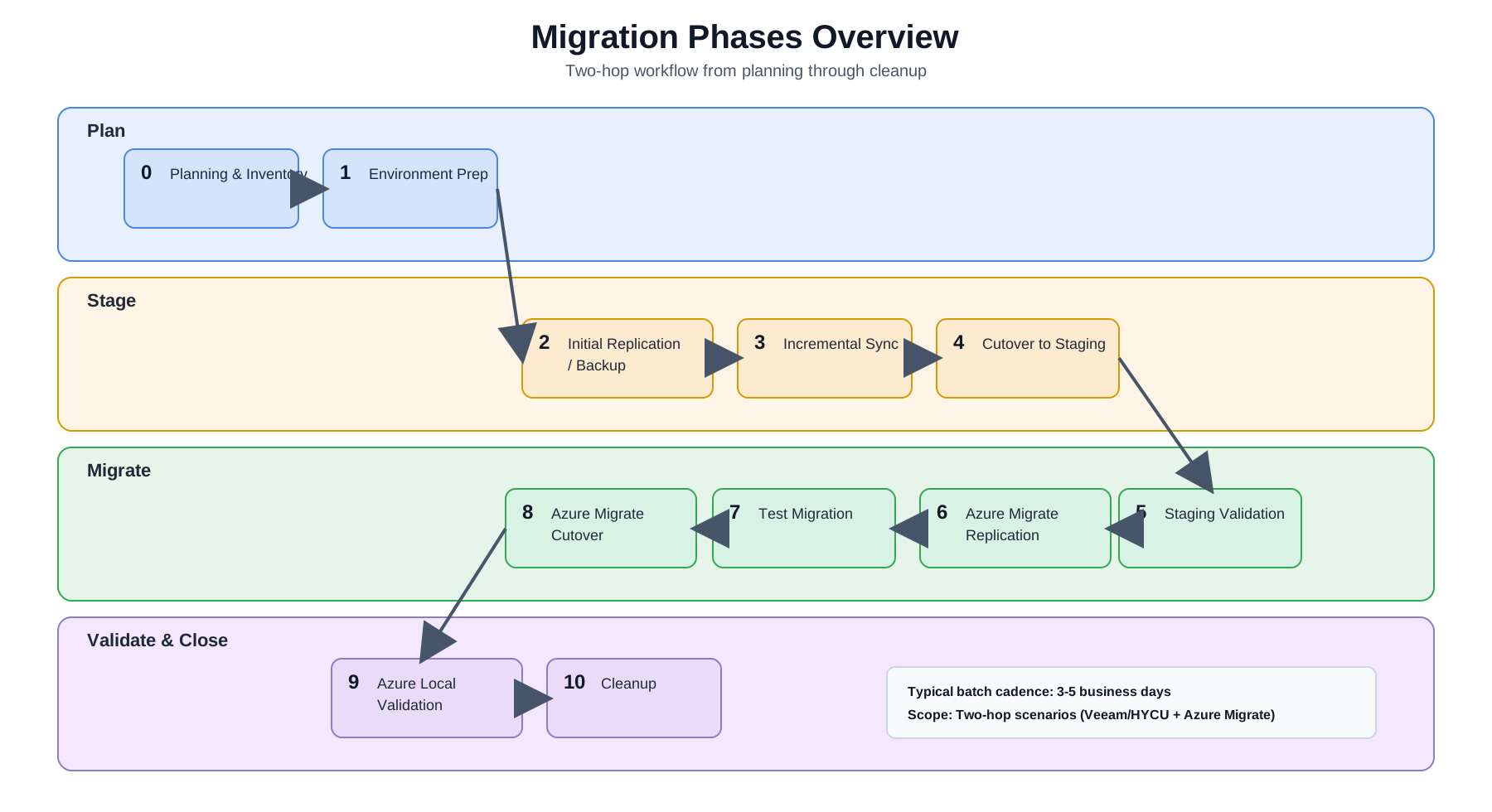
Draw.io source: migration-diagrams-phases-overview.drawio
| Phase | Name | Key Activities |
|---|---|---|
| 0 | Planning & Inventory | VM inventory, batch planning, network mapping, stakeholder alignment |
| 1 | Environment Preparation | Provision staging hosts, install tools, configure sources and targets |
| 2 | Initial Replication / Backup | Full copy of VMs from Nutanix to staging Hyper-V |
| 3 | Incremental Sync | Ongoing delta syncs to keep replicas/backups current |
| 4 | Cutover | Final sync, source VM shutdown, staging VM promotion |
| 5 | Staging Validation | Validate VMs on Hyper-V: boot, network, applications, DNS |
| 6 | Azure Migrate Replication | Replicate VHDX disks from Hyper-V to Azure Local CSV storage |
| 7 | Test Migration | Test failover to isolated network on Azure Local |
| 8 | Azure Migrate Cutover | Create production Azure Local VMs |
| 9 | Azure Local Validation | Full application validation on Azure Local |
| 10 | Cleanup | Delete staging VMs, decommission source VMs, free licenses |
Phase 0 — Planning & Inventory
Before any migration work begins:
- VM Inventory: Export a full list of VMs from Prism (AHV) or vCenter (ESXi). Document OS, vCPU, RAM, used disk, running services, IP addresses, DNS names, and AD membership for every VM.
- Batch Planning: Organize VMs into batches of 8–10. Group by application affinity (keep coupled VMs together), disk size (predictable storage), and criticality (migrate dev/test first).
- Network Mapping: Document source VLANs and subnet mappings for every VM. Decide on the IP strategy — preserve IPs (same VLAN) vs. re-IP (new subnet). Pre-stage DNS changes with low TTL (300 seconds).
- Dependency Mapping: Identify inter-VM dependencies. Co-migrate tightly coupled VMs in the same batch.
- Stakeholder Alignment: Get maintenance windows approved. Define rollback criteria.
Start with a PoC
Before migrating production VMs, run the Proof of Concept plan to validate tool selection and staging option for your specific environment.
Phase 1 — Environment Preparation
These preparation steps apply to two-hop scenarios with a Hyper-V staging layer.
- Provision the Hyper-V staging host(s) with appropriate storage (1–5 TB depending on batch sizes)
- Install and license the migration tool for the selected path (Veeam, HYCU, or Commvault)
- Add Nutanix cluster as a source in the tool
- Add Hyper-V host(s) as a target in the tool
- Create the Azure Migrate project in the Azure portal
- Deploy the Azure Migrate appliance VM on the Hyper-V staging host
- Register the appliance with the Azure Migrate project
- Verify network connectivity: Nutanix → staging → Azure Local → Azure (outbound HTTPS 443)
- Verify Azure Local cluster health and available CSV capacity
Phase 2 — Initial Replication / Backup
- Create migration jobs/policies for the first batch (8–10 VMs)
- Run the initial full replication or full backup
- Monitor progress and verify completion
- Time varies by VM disk size and network bandwidth — plan for 4–24 hours per batch on first run
Phase 3 — Incremental Sync
- Allow incremental syncs to run on schedule (daily or more frequent)
- Monitor for errors and resync as needed
- The longer this phase runs, the smaller the final cutover delta will be
Phase 4 — Cutover
- Notify stakeholders — maintenance window begins
- Trigger a final incremental sync/backup
- Power off source VMs on Nutanix
- Run one more sync/backup to capture final dirty blocks
- Fail over or restore the VMs to Hyper-V staging using the selected tool
- Proceed to Phase 5
Do not delete source VMs
Source VMs on Nutanix are your rollback point throughout the entire pipeline. Do NOT decommission them until VMs are fully validated on Azure Local.
Phase 5 — Staging Validation
For each VM in the batch:
- [ ] VM boots successfully on Hyper-V
- [ ] Network connectivity: ping gateway, ping DNS server
- [ ] DNS resolution:
nslookup <hostname>resolves to correct IP - [ ] AD domain membership:
Test-ComputerSecureChannelor check in ADUC - [ ] Application smoke test: web server responds, database accepts connections, etc.
- [ ] Windows/Linux services are running as expected
Phase 6 — Azure Migrate Replication
- In the Azure Migrate project, select the current batch of VMs on Hyper-V for replication (typically 8-10)
- Set target: Azure Local cluster + target CSV volume
- Configure VM names and network mapping
- Start replication — wait for Protected state (initial full copy complete)
- Time: 4–24 hours depending on disk size
Phase 7 — Test Migration
- Run a test failover for all VMs to an isolated network on Azure Local
- Repeat Phase 5 validation steps on the Azure Local test VMs
- Clean up test VMs after validation
Phase 8 — Azure Migrate Cutover
- Trigger Migrate for all VMs in the batch
- Azure Migrate performs a final delta sync and creates production Azure Local VMs
- Confirm VMs are visible in the Azure portal as Azure Local VMs
Phase 9 — Azure Local Validation
Full validation of production VMs on Azure Local:
- [ ] All Phase 5 checks pass on Azure Local
- [ ] Azure Local VM resource status shows healthy/connected in the Azure portal
- [ ] Azure Monitor agents are reporting
- [ ] Update Manager shows the VM
- [ ] Application team sign-off
Phase 10 — Cleanup
Once the batch is fully validated on Azure Local:
- Delete staged VMs from the Hyper-V staging host (free storage for the next batch)
- Delete Veeam replicas or HYCU backup policies for this batch
- Decommission source VMs on Nutanix (power off, then delete after a holding period)
- Begin the next batch
Batch Timing Estimate
| Activity | Estimated Duration |
|---|---|
| Initial replication/backup | 4–24 hours |
| Incremental sync period | 1–7 days |
| Cutover window | 30–90 minutes |
| Staging validation | 2–4 hours |
| Azure Migrate replication | 4–24 hours |
| Test migration + validation | 2–4 hours |
| Azure Migrate cutover | 30–60 minutes |
| Azure Local validation | 2–4 hours |
| Total per batch | 3–5 business days |
With 1–2 batches per week, a 300-VM migration completes in 15–30 weeks (4–8 months).