Operator Prerequisites
This page explains how to install AzureLocalRanger from source today, where it should run, what it needs to reach, and what must be in place before starting a run. For the canonical prerequisite checklist, see Prerequisites.
Operator Journey
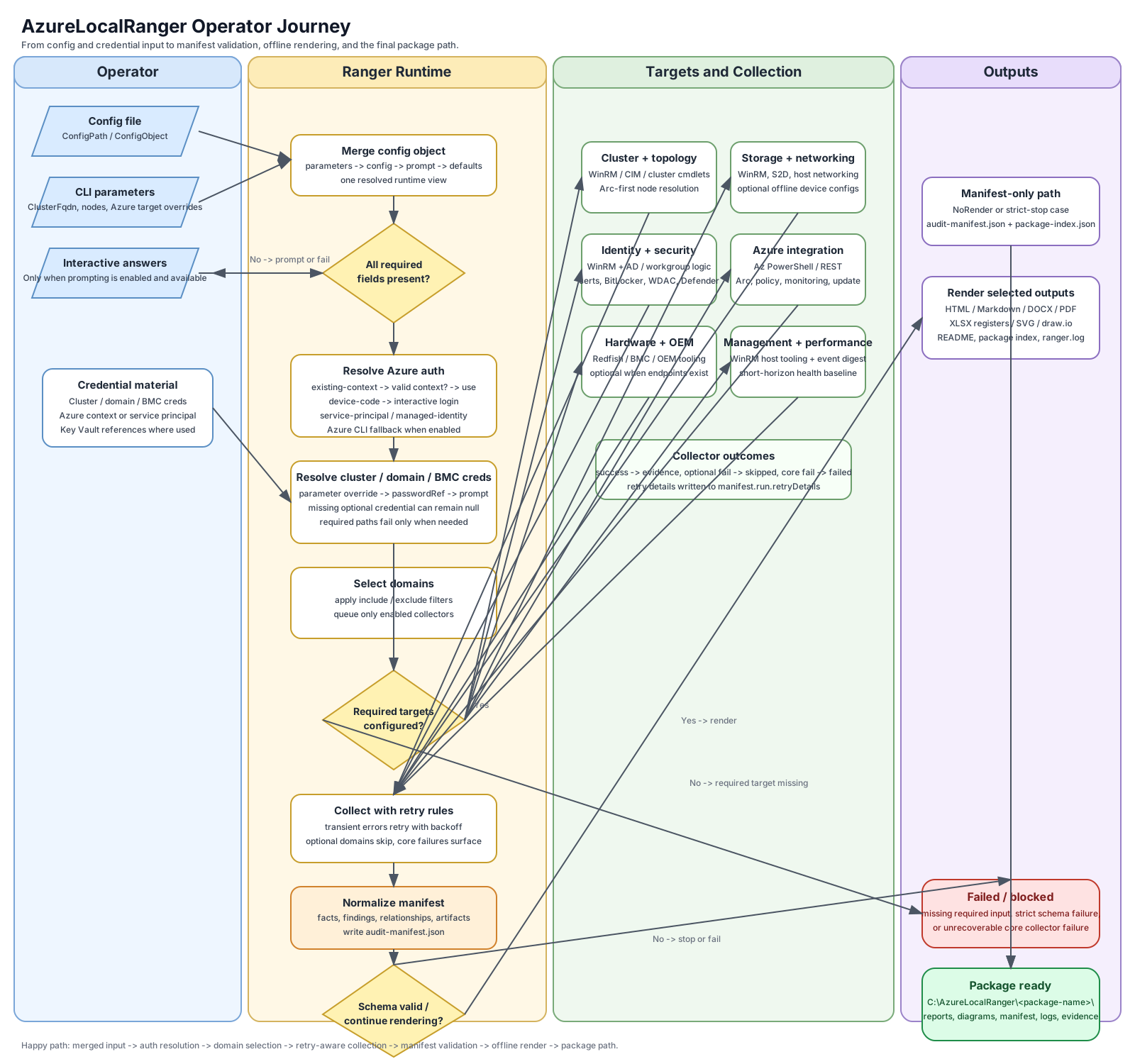
Quick-start Checklist
Complete these steps once before your first run:
- [ ] PowerShell 7.x installed on the execution machine
- [ ]
Import-Modulefrom a local clone (or install from PSGallery once publication is complete) - [ ]
Test-AzureLocalRangerPrerequisites -InstallPrerequisitespasses all checks - [ ] WinRM TrustedHosts configured to include cluster node IPs and cluster VIP
- [ ] Azure context established (
Connect-AzAccount) or service-principal provided in config - [ ] Config file generated and required fields filled in
See the sections below for details on each step.
Installation
From PSGallery (after publication)
From source (current path)
git clone https://github.com/AzureLocal/azurelocal-ranger.git
cd azurelocal-ranger
Import-Module ./AzureLocalRanger.psd1 -Force
Validate prerequisites after install
The -InstallPrerequisites switch automatically installs RSAT ActiveDirectory and the required Az PowerShell modules when they are missing. An elevated (Administrator) session is required.
# Check without installing
Test-AzureLocalRangerPrerequisites

# Check and auto-install missing components (elevated session required)
Test-AzureLocalRangerPrerequisites -InstallPrerequisites
The command outputs a table showing which checks passed and which need attention.
Generate a config file
Open the file and fill in every field marked [REQUIRED]. See Configuration for a complete field reference.
Recommended Execution Environment
Run Ranger from a management workstation or jump box that can reach the required targets.
The recommended machine should have network access to:
- the Azure Local management network
- the out-of-band or BMC network when hardware discovery is required
- Azure endpoints used for Arc, monitoring, policy, backup, and related services
Running directly on a cluster node is not the preferred operating model.
Software Prerequisites
The runtime requires:
- PowerShell 7.x
Az.AccountsandAz.Resources— for Azure-side discovery- RSAT ActiveDirectory PowerShell module (
Rsat.ActiveDirectory.DS-LDS.Tools~~~~0.0.1.0on Windows client / multi-session;RSAT-AD-PowerShellon Windows Server) - Azure CLI — optional, used as fallback when Az PowerShell context is unavailable
The following modules are optional but unlock additional capabilities:
| Module | Capability | Install |
|---|---|---|
Az.ConnectedMachine |
Arc Run Command transport — WinRM fallback when ports 5985/5986 are blocked | Install-Module Az.ConnectedMachine |
PwshSpectreConsole |
Live per-collector progress bars via -ShowProgress; falls back to Write-Progress if absent |
Install-Module PwshSpectreConsole |
Network access to WinRM, HTTPS Redfish endpoints, and Azure public or approved private endpoints is required as applicable to the selected domains.
WinRM Client Configuration
Ranger uses WinRM (PowerShell remoting) to run commands on cluster nodes. The execution machine must have the WinRM service running and both the node IPs and the cluster VIP added to the WinRM TrustedHosts list before Test-WSMan or Invoke-Command will succeed. The cluster VIP is required because Ranger may target the cluster name (which resolves to the VIP) in addition to individual nodes.
This is required when the execution machine is not domain-joined to the same domain as the cluster nodes (for example, an AVD session host or a local workstation authenticating with explicit credentials).
Run the following once from an elevated PowerShell session on the execution machine:
# Start WinRM if not already running
Start-Service WinRM
Set-Service WinRM -StartupType Automatic

# Add cluster node IPs and cluster VIP to TrustedHosts (adjust IPs for the target environment)
Set-Item WSMan:\localhost\Client\TrustedHosts -Value "192.168.211.11,192.168.211.12,192.168.211.13,192.168.211.14,192.168.211.20" -Force
To append to existing entries rather than overwriting:
$existing = (Get-Item WSMan:\localhost\Client\TrustedHosts).Value
$new = if ($existing) { "$existing,192.168.211.11,192.168.211.12,192.168.211.13,192.168.211.14,192.168.211.20" } else { "192.168.211.11,192.168.211.12,192.168.211.13,192.168.211.14,192.168.211.20" }
Set-Item WSMan:\localhost\Client\TrustedHosts -Value $new -Force
Note: TrustedHosts bypasses Kerberos mutual authentication. Only add hosts you trust. Using IP addresses instead of hostnames limits the exposure to the known network range.
The -InstallPrerequisites switch on Test-AzureLocalRangerPrerequisites does not configure WinRM or TrustedHosts — this must be done manually in an elevated session before running Ranger.
Minimum Inputs
Ranger v2.6.3 lowered the required-input floor. Pick the invocation style that fits your workflow:
- Two fields —
-TenantId+-SubscriptionId. Ranger enumerates themicrosoft.azurestackhci/clustersresources in the subscription and auto-selects the only match (or prompts a menu when there are several). Azure Arc then auto-discovers the resource group, cluster FQDN, node list, and AD domain from the selected cluster resource. No config file required. - Three fields —
-TenantId+-SubscriptionId+-ClusterName. Skips the cluster-selection prompt when you already know the name. Everything else is still auto-discovered from Arc. - Full config file.
New-AzureLocalRangerConfig -Path .\ranger.ymlfollowed by editing the annotated YAML. Best for CI / scheduled runs and team-standard deployments where the config is version-controlled.
For any path you also need network access to the cluster's management network and an account that can authenticate over WinRM (or an Arc-registered cluster for the Arc Run Command transport fallback).
Hardware discovery adds:
- BMC / iDRAC target list (OOB-network hosts, one per node)
- BMC or iDRAC credential
Network device discovery (switches, firewalls) adds target lists for each device class and matching credentials — populate these only when you're running against a cluster whose ToR switches and firewalls you also need to document.
Network Reachability
Different domains need different network paths.
| Path | Used for |
|---|---|
| WinRM to cluster nodes | Cluster, storage, networking, VM, identity/security, management tools, performance |
| HTTPS to BMC/Redfish endpoints | OEM hardware and management-layer discovery |
| HTTPS to Azure endpoints | Azure integration, monitoring, update, policy, backup, and Arc-related discovery |
| Optional vendor API or SSH reachability | Future direct switch or firewall interrogation |
If a domain’s network path is unavailable, that domain should be skipped or marked partial instead of blocking the entire run.
Variant-Specific Prerequisites
Hyperconverged
This is the baseline shape. Standard management-network, Azure, and optional BMC reachability applies.
Switchless Storage Fabric
Storage-network switch interrogation is not relevant. Host-side networking evidence becomes more important than direct switch evidence.
Rack-Aware
Ranger should expect rack assignments and availability-zone-style placement behavior. Operators may need to provide manual evidence if rack metadata is not discoverable from the host side.
Local Identity with Azure Key Vault
Current Microsoft documentation describes these extra prerequisites:
- the cluster runs without Active Directory
- a consistent local administrator account exists across nodes
- static IP addressing is required
- DNS zones and host records must already be configured
- Azure Key Vault is used for backup secrets
- SSH access to Arc-enabled servers may be needed for some remote Azure-portal workflows
Windows Admin Center is not supported in this mode, and SCVMM support is limited or unsupported.
Disconnected Operations
Disconnected environments need extra planning because the local control plane consumes additional capacity and connectivity assumptions differ from connected Azure Local.
Current Microsoft documentation indicates that disconnected operations require:
- approved disconnected-operations eligibility
- extra capacity for the local control plane
- a dedicated management cluster in the current documented disconnected model
- careful planning for PKI, identity, and local monitoring paths
Multi-Rack Preview
Current Microsoft documentation describes multi-rack as a preview architecture with:
- one main rack for network aggregation and SAN storage
- several compute racks
- managed networking exposed through Azure APIs and ARM
- Azure ExpressRoute in the documented preview architecture
This is not a standard hyperconverged deployment and should be treated as variant-specific.
Arc Run Command Transport (v1.2.0+)
When cluster nodes are unreachable on WinRM ports 5985/5986 — for example when running from outside the management VLAN — Ranger can fall back to Azure Arc Run Command, which routes commands through the Azure control plane instead.
Requirements:
Az.ConnectedMachinemodule installed (Install-Module Az.ConnectedMachine)- Active Az PowerShell context with access to the cluster's subscription and resource group
- Nodes registered as Arc-enabled servers
Control the transport mode with behavior.transport in config (or leave as default auto):
behavior:
  transport: auto   # try WinRM first; fall back to Arc if all nodes are unreachable
  # transport: winrm  # force WinRM only
  # transport: arc    # force Arc Run Command only
When transport: auto and Arc is unavailable (module missing or no Az context), Ranger falls back to WinRM-only and logs the reason.
Pre-Run Connectivity Assessment
Ranger probes all configured transport surfaces before any collector runs. The probe result is stored in manifest.run.connectivity and determines which collectors run or skip:
| Posture | Meaning |
|---|---|
connected |
Cluster WinRM reachable; Azure management plane reachable (or not configured) |
semi-connected |
Cluster WinRM reachable; Azure management plane unreachable |
disconnected |
Cluster WinRM unreachable from this runner |
Collectors whose transport surface is confirmed unreachable receive status: skipped rather than being attempted and failing. This behavior is controlled by behavior.degradationMode: graceful (default) or strict.
Before You Run Ranger
Before a meaningful run, verify:
- you are on the right workstation or jump box
- the WinRM service is running on the execution machine and cluster node IPs are in TrustedHosts (see WinRM Client Configuration above)
- cluster WinRM access works (
Test-WSMan -ComputerName <node-ip> -Credential <domain-cred> -Authentication Negotiate), or Arc Run Command transport is configured as fallback - Azure authentication works for the intended subscription and resource group
- BMC endpoints are reachable if hardware discovery is included
- DNS, proxy, and firewall posture allow the selected domains to communicate
- you understand which domains are expected to run and which should be skipped