Overview
Zero-touch provisioning for Azure Local: from bare machines to nodes that are ready for cluster Validate, with one command and no USB stick.
What this repo does
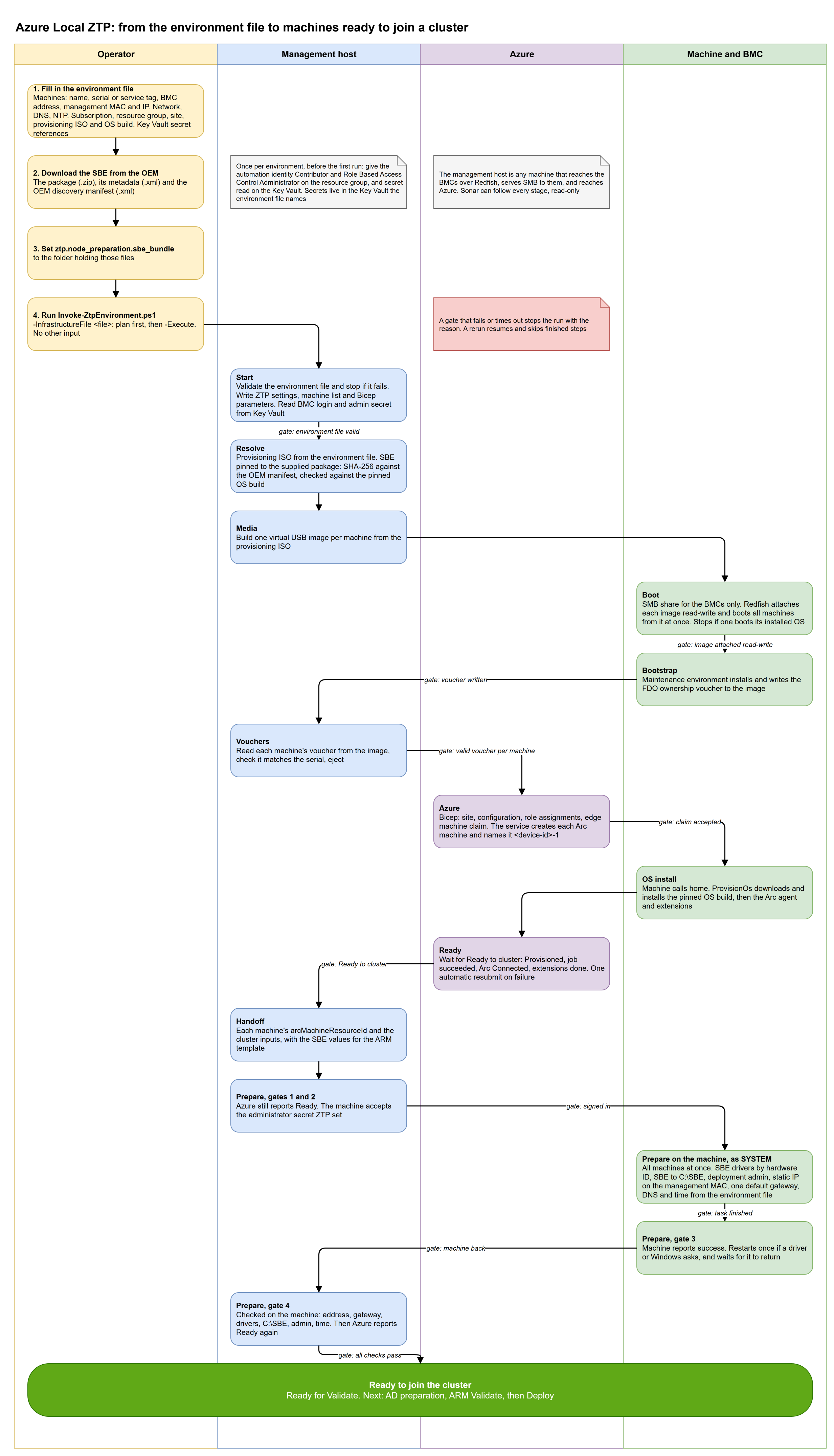
Microsoft's simplified machine provisioning (preview) has an operator write a USB stick, plug it into each machine, collect each voucher, and claim the machines in the portal. This repo automates the whole flow from a management host or a pipeline:
- Downloads and checks the maintenance ISO, and builds one virtual USB image per node.
- Boots each node from its image over the BMC (Redfish virtual media). No one needs to be in the rack.
- Reads each node's ownership voucher back from its image.
- Claims the machines in Azure with a Bicep template, waits for the OS install and Arc, and resubmits a failed OS install once.
- Installs the OEM's network drivers from the SBE, copies the SBE to
C:\SBE, creates the deployment admin and sets one static management address. - Writes a handoff with each machine's
arcMachineResourceIdfor the cluster deployment.
You supply two things: an environment file and the OEM's SBE. Then you run Invoke-ZtpEnvironment.ps1, first as a plan, then with -Execute.
Status
| Item | State |
|---|---|
| Microsoft feature | Preview. Provisioning resources in East US only. Arc gateway not supported (Learn). |
| End-to-end flow | Proven on Dell AX-760 / iDRAC 7.30, two nodes, Azure Local build 12.2690.1003.15, maintenance image 10.2610.0.3063. AX-760 isn't on Learn's validated list for this flow, so it's not supported by Microsoft. |
| Other OEMs | The BMC handling and Prepare are proven on Dell iDRAC only. Lenovo, HPE and Supermicro have OEM files with the SBE manifest address only. |
| Scope | Ends at "ready for Validate". Active Directory preparation, Validate and Deploy are separate. |
Where to start
| If you want to... | Read |
|---|---|
| Understand the stages, gates, data flow and limits | Design and architecture |
| Run it from a management host | Operator guide |
| Fill in the environment file | Environment file reference |
| Run it from Azure DevOps, GitHub Actions or GitLab CI | Running from a pipeline |
| Fix a failed or slow run | Troubleshooting and known issues |
| Drive the orchestrator directly, or read the event format | Orchestrator reference |
| Know how the ISO and SBE are found and checked | Bootstrap media and the OEM SBE |
| Know how the virtual USB boot and voucher read-back work | Redfish virtual USB and voucher read-back |
| Know what the Azure template creates | Azure provisioning from vouchers |
The Server preparation and Azure portal provisioning guides describe an earlier, manual route. They're kept for reference and are superseded by the operator guide.